When working with Cloud Native applications on top of Kubernetes, you might need to make some tough decisions about where to run the services and infrastructure that your applications need, which will directly impact your maintenance costs.
Camunda Platform Run, or Camunda Run for short, is a lightweight distribution of Camunda Platform that works straight out-of-the-box and comes pre-configured for production environments. Camunda Run is an excellent option if you’re just getting started with Camunda, or if you’re ready to use Camunda Platform in production. You can download the open-source Community Edition for free, and easily upgrade to the Enterprise Edition to access more features and support options. After you download and extract Camunda Run, you’ll find a configuration folder that contains a file called production.yml. The properties defined in this file are important for production environments and are derived from our guide to securing your Camunda Platform installation. To start Camunda Run with the production.yml configuration,…
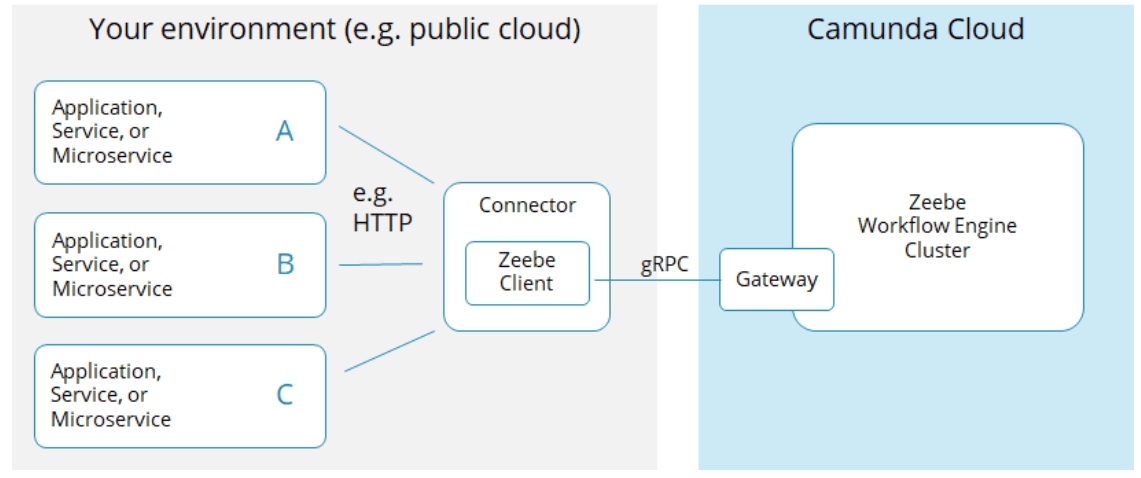
Have you started your first project using process automation as a service with Camunda Cloud? One of your first tasks would be to sketch the basic architecture of your solution, and this blog post will guide you through some important early questions such as how to connect the workflow engine with your application or with remote systems? Or what’s a job worker, what should it do, and how many do you need? This post is the first piece of a series of upcoming blog posts: Connecting the Workflow Engine with Your Application The workflow engine Zeebe is a remote system for your applications, just like a database. Your application connects with Zeebe via remote protocols, gRPC to be precise, which…
When working with multiple projects and multiple Cloud Services automation becomes a must. Camunda Cloud resources such as Zeebe Clusters and Camunda Operate are no different from other components such as Databases, or Message brokers, these need to be provisioned for your applications to connect with. This project allows you to connect to the Camunda Cloud Console using the Go language or a command-line tool, allowing you to create automation around when remote environments are created and destroyed. You can connect to these APIs using any language as these APIs are just REST endpoints, but if you have automated pipelines using a command-line tool might be the best fit for you. This project provides a binary that you can download…
In our recent webinar titled “Communication Between Loosely Coupled Microservices” we got a lot of great questions and because of the limited time some were left unanswered. As community questions are really important to me I want to follow my tradition to answer remaining questions in a blog post (as I have for example also done roughly a year ago in “Webinar FAQ for Monitoring & Orchestrating Your Microservices Landscape using Workflow Automation”). What Was The Webinar About? You can find the slides (here) and recording (here) online. The webinar covered different styles of communication. This was explained by looking at how ordering food works: The communication style is very different from styles of collaboration of services, which was also discussed: The following table gives an…
Have you ever fired up the Camunda Platform Docker instance and wished you could do live-calls to the API via a swagger server? We have! And like most things we wish we could do, we go out and make it happen. Coming soon To be clear, this integration is coming to the official Camunda Platform Docker container with release 7.15. It’s just not ready yet. So this is really more of an interim solution rather than the be-all and end-all solution, but it works, and it makes sending API calls to a live instance of Camunda Platform a lot easier. So follow along and we’ll show you how to run it yourself. CORS is your friend, and not your friend In general, and…
This article is the fourth in a series exploring fun, straightforward ways you can control workflows using Camunda Cloud — have a read of the others for some background if you’d like to see Camunda Cloud in action with Restzeebe, without a line of code: Do you use Slack? How about adding a level of automation to this widely used collaboration tool, that is making email obsolete in many organizations? Let’s say you already widely use Slack in your company and want to receive an active notification when a new user has registered to your service? You can create a new channel just for that purpose and all Slack users who are interested can join the channel. If you already have an onboarding…
Setting up your Telegram channel with Camunda Cloud If you’re a runner, then you know it’s important to change your running shoes from time to time. I’ve run many miles with the Camunda Platform. I’ve used it for my own projects, for tutorials, and taught people how to use it in workshops. Now, it’s time to put on some new shoes: it’s time to automate a process with Camunda Cloud. If you’ve also been using Camunda Platform and are interested in what it looks like to move to Camunda Cloud, come for a run with me. In the continuing pandemic situation, I need to stay informed, and know as soon as the situation relaxes. I find myself checking the Corona…