
Camunda 8.10.0-alpha1 is now live and available for download. If you're a SaaS customer who stays current, you may have already noticed some of these features as we make them available automatically when they're ready.
Below are the highlighted features shipping with 8.10-alpha1. For the complete list of updates, review the release notes.
Value at a glance
Our latest alpha delivers meaningful improvements across the full development and operations stack.
If you are an operations engineer that monitors process states, you can now inspect, edit, and copy JSON payloads with a dedicated variable viewer. This means no need to open in Edit mode to understand what a variable contains. Troubleshooting is faster and less error-prone, whether you're working through a live incident or reviewing a completed instance.
For developers, execution listeners now support configurable headers using the same pattern already established for service task job workers. One consistent configuration approach across your entire job worker infrastructure, and one fewer blocker for those organizations migrating from Camunda 7.
Organizations that rely on ABBYY for its OCR accuracy and language coverage can connect it directly from the modeler with 8.10.0-alpha1. No need for custom code or no separate onboarding path now that Camunda IDP supports ABBYY as a native extraction provider.
For teams ready to explore agentic orchestration, the Camunda-provided LLM removes the biggest early blocker eliminating the need to provision LLM credentials before seeing any value. Enable AI features once in Console, and your team can go from curiosity to a running AI agent in minutes.
And for teams building AI agents, the Processes MCP Server and the new MCP start event element template make every deployed process directly callable as an MCP tool. Configure a process as an MCP tool in the modeler, deploy it, and it's immediately available to any MCP-compatible agent framework. No custom integration layer required.
Structured variable viewer
Inspecting process state in Operate just got significantly more straightforward. Large or nested JSON payloads used to be flattened into a single collapsed line, truncated at the viewport edge, and the only path to understanding them was through Edit mode. This meant you had to touch each variable just to read it. For operations engineers working through a production incident, that's the last kind of friction you need.
Operate's new Structured Variable Viewer removes this situation by allowing a direct “Open in JSON viewer” action that lets you inspect any variable without entering Edit mode. Structured data renders with proper inline formatting instead of collapsing into a single unreadable line with truncated values expanded on demand.
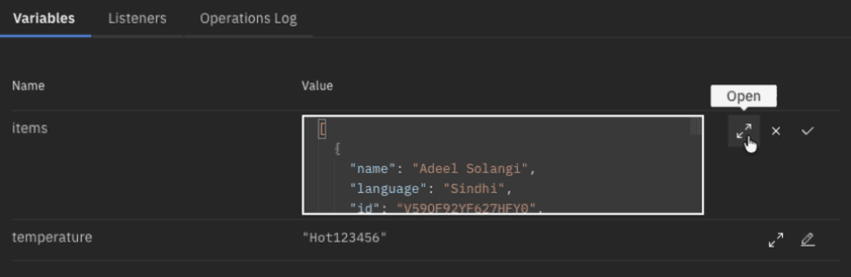
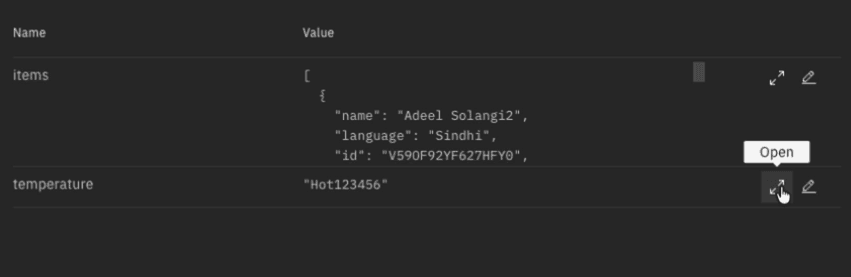
The multi-line editor grows with your input, making updates easier to manage. And full payloads can be copied to clipboard reliably from the JSON viewer modal removing the need to select around partially visible text hoping you captured the whole thing.
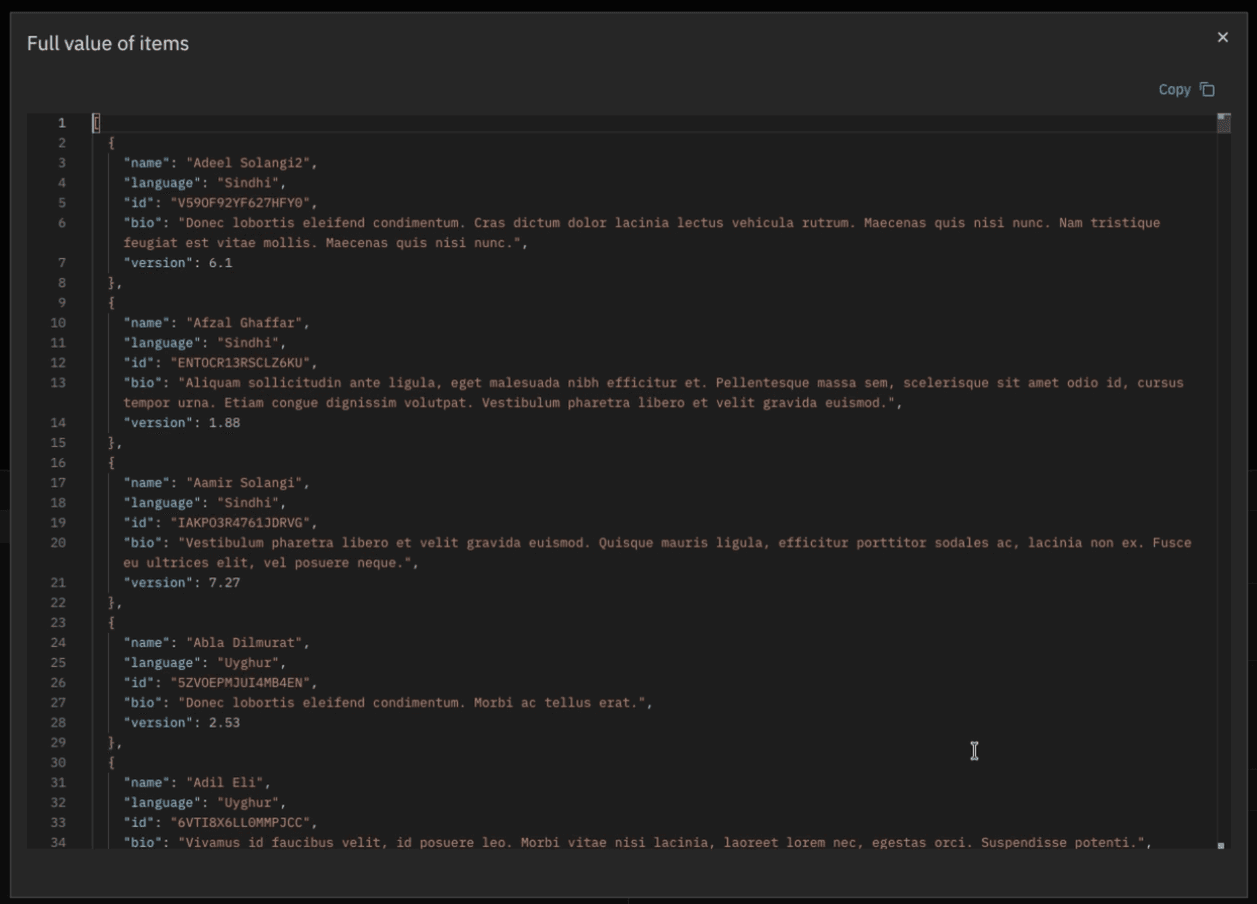
The experience is consistent across running and completed process instances. Whether you're troubleshooting an active case or reviewing what happened after the fact, how you inspect and work with variables doesn't change.
Execution listener configuration headers
If you've built a job worker for a service task, you know how headers work. You define them in the modeler, they travel with the job to your worker, and your worker reads configuration or metadata without requiring hard-coded values in the worker logic.
Execution listeners run on the same infrastructure. But until now, they didn't support headers. Teams were working around it creatively. This also posed a migration concern. This capability existed in Camunda 7 as field injection. Its absence in Camunda 8 was a concrete blocker for teams moving to the new version.
Execution listeners now support configurable headers. You define them in the modeler, and they pass through the engine to your job worker and they work exactly how service task headers work.
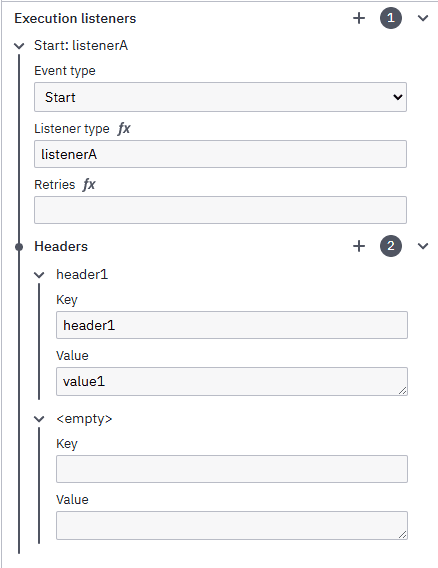
No more workarounds are required. One consistent pattern across your entire job worker infrastructure.
ABBYY as an IDP provider
Camunda's Intelligent Document Processing (IDP) already supports multiple extraction providers. Now, for organizations that rely on ABBYY’s enterprise-grade OCR accuracy, its broad language coverage, or simply because it's already deployed and approved in their environment, Camunda has added support for ABBY as an available option for IDP.
Now that ABBYY is a native IDP provider in Camunda, you can configure your ABBYY connector secrets for your cluster, and ABBYY appears automatically as an option when you set up extraction templates. No custom code, no separate wiring. Configure your template, test extraction results before going to production, and standardize on the tool your organization already trusts.
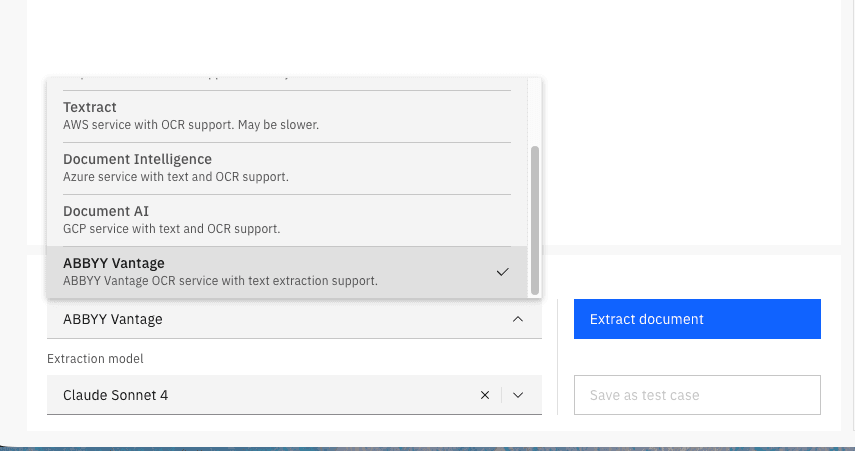
ABBYY is now on equal footing with other first-class IDP providers using the same configuration experience, same onboarding path, same template-based workflow from day one.
Camunda-provided LLM
Agentic orchestration has a well-documented first-mile problem. Before you write a single line of process logic, you need an LLM account, API keys, cloud credentials, a budget allocation from finance, and a provider decision your security team is comfortable with. For a team evaluating whether agentic orchestration fits their use case, that's a lot of infrastructure to navigate before seeing any value, and it's consistently where early momentum stalls.
Our Camunda-provided LLM eliminates those prerequisites for SaaS users. You can enable AI features at the organization level in Console, and Camunda auto-provisions a managed LLM endpoint. You can start immediately going from curiosity to a running AI agent in minutes. No need to sign up for a provider, get budget approvals, and no need to untangle credentials.
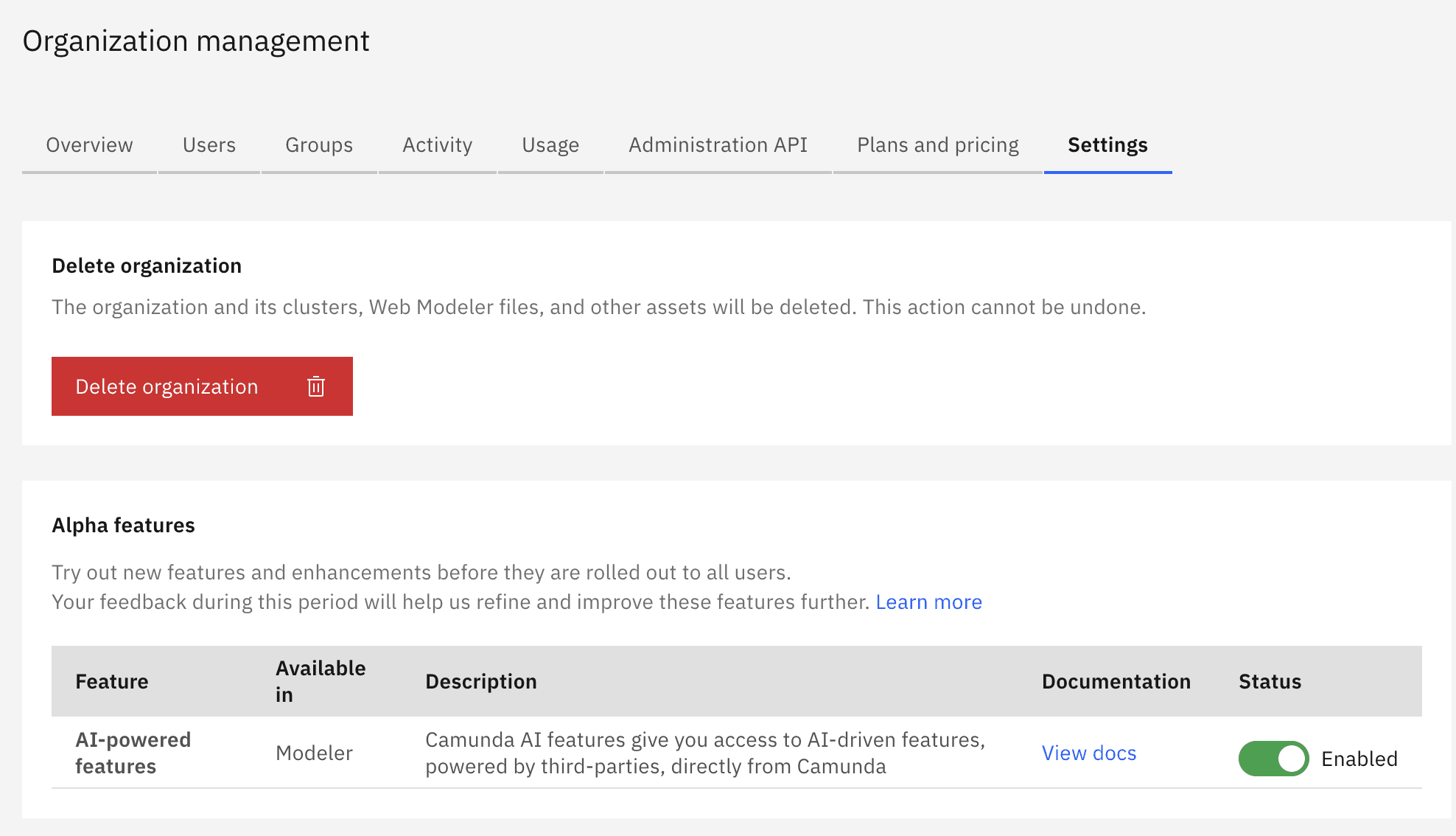
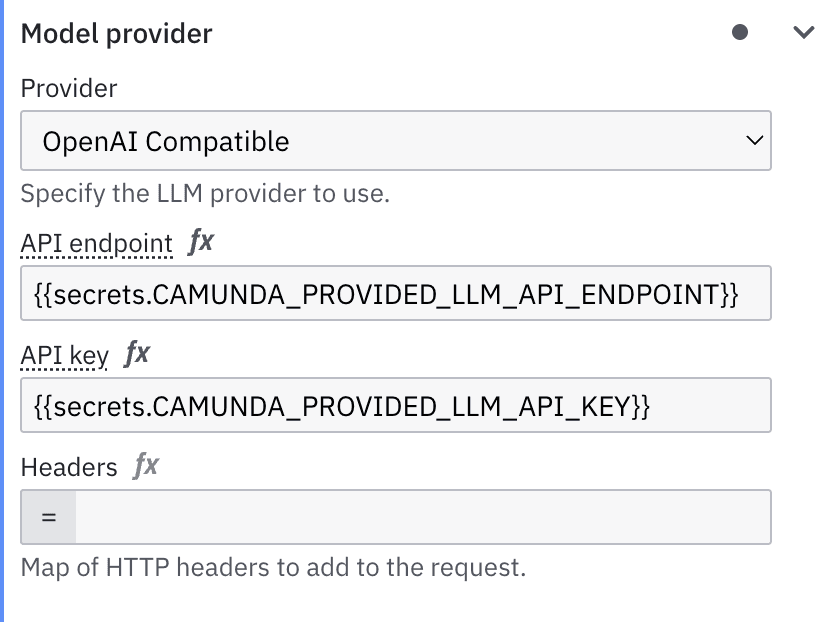
A capped shared budget with spend visibility in Console keeps experimentation safe and predictable. You can see exactly what's being consumed against the available budget, so there are no surprises for whoever approved the trial.
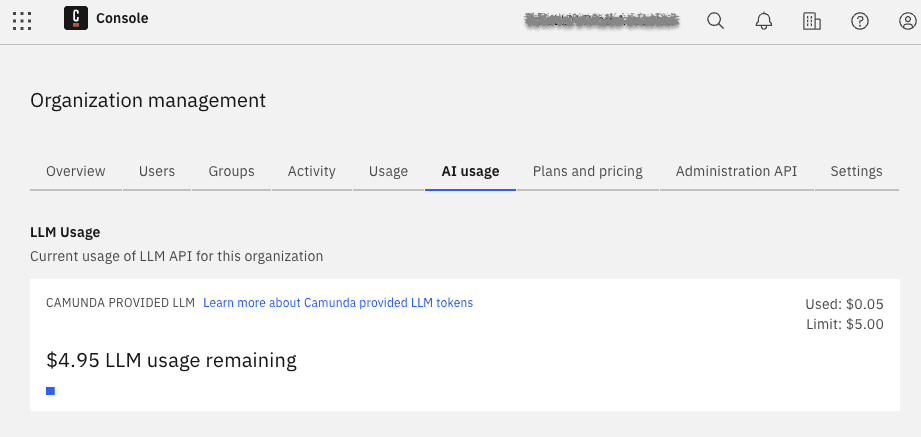
And when you're ready for production, switching to your own LLM provider is just a quick configuration change. The orchestration model you built, the process logic you validated, and the agents you designed all carry forward unchanged.
Processes MCP server and MCP start event template
With Camunda’s new Processes MCP Server, AI agents can now discover and call your deployed processes as Model Context Protocol (MCP) tools. With this new functionality, if your AI agents need to call your business processes, you do not need to build a custom integration layer between your agent framework and your process engine.
In addition to our MCP server capability in 8.10.0-alpha1, we also offer the MCP startevent element template for both Web Modeler and Desktop Modeler. Apply it to a BPMN message start event to configure the process as an MCP tool: give it a name, describe its purpose, define its inputs, and add usage guidance for the LLMs that will invoke it. That metadata travels with the process definition and tells agent frameworks exactly what the process does and how to call it with no external documentation required.
At runtime, the Processes MCP Server takes it from there. Deploy a process configured with an MCP start event, and it's automatically registered as a callable Model Context Protocol (MCP) tool. MCP clients — including any MCP-compatible AI agent framework — connect to the ```/mcp/processes endpoint and can invoke any registered process directly. The Orchestration Cluster starts a new process instance and returns the process instance key immediately.
The server also exposes static tools for inspecting running process instances. Agents can check variables, state, and incidents without switching servers or building separate introspection integrations.
What this means in practice: the process logic you've already built, tested, and validated — the approval flows, the document handling, the exception routing — is now directly callable by AI agents without custom wiring. You don't have to rebuild your business capabilities for the AI era. You expose them.
Thank you
We hope you enjoy the latest updates in Camunda 8.10.0-alpha1. For the complete list of changes, review the release notes. If you have feedback or questions, contact us or share your thoughts on the Camunda forum.