
Say yes to every team without losing control
Camunda Hub gives every team a governed space to build in, a catalog of approved work to start from, and a faster path to production. Your center of excellence sees what’s live across the organization and the business results it produces.
Routing every team through one queue slows everyone down
Automation usually starts with one team, and it works. Then a second team wants in, then a third. Soon nobody can answer the simple questions: what’s live, who owns it, and is it still the version somebody approved. The usual fix quickly becomes the reason nothing ships on time.
Speed and control can come from the same platform. When boundaries are set once and approved building blocks are easy to find, each new team adds delivery capacity to the program.
Missed market windows
Launch dates depend on setup work, rebuilding what could have been reused — not product decisions.
Inconsistent processes
When a policy changes, the fix has to reach every copy. The copy that gets missed becomes an audit finding.
Rising cost to run
Every duplicated integration is another thing to patch and another place a changed credential has to reach. Every new cluster is another one to back up, monitor, and upgrade.
Shadow automation and AI
Teams that can’t wait build outside the platform, where the CoE can’t see them.
An unfunded next phase
Nobody can show what the program delivered against the targets the business set, so budget defense becomes a spreadsheet built by hand or a gut feeling instead of KPI data.
“Big wins come from reducing organizational friction, not from harnessing technology.”

Forrester, Best Practices For Automation Centers Of Excellence (CoEs), February 2026
Team autonomy and central governance on the same platform
Delivery teams build and ship on their own schedule. The CoE sets the standards they build to and sees the results.
Scale delivery through governed self-service
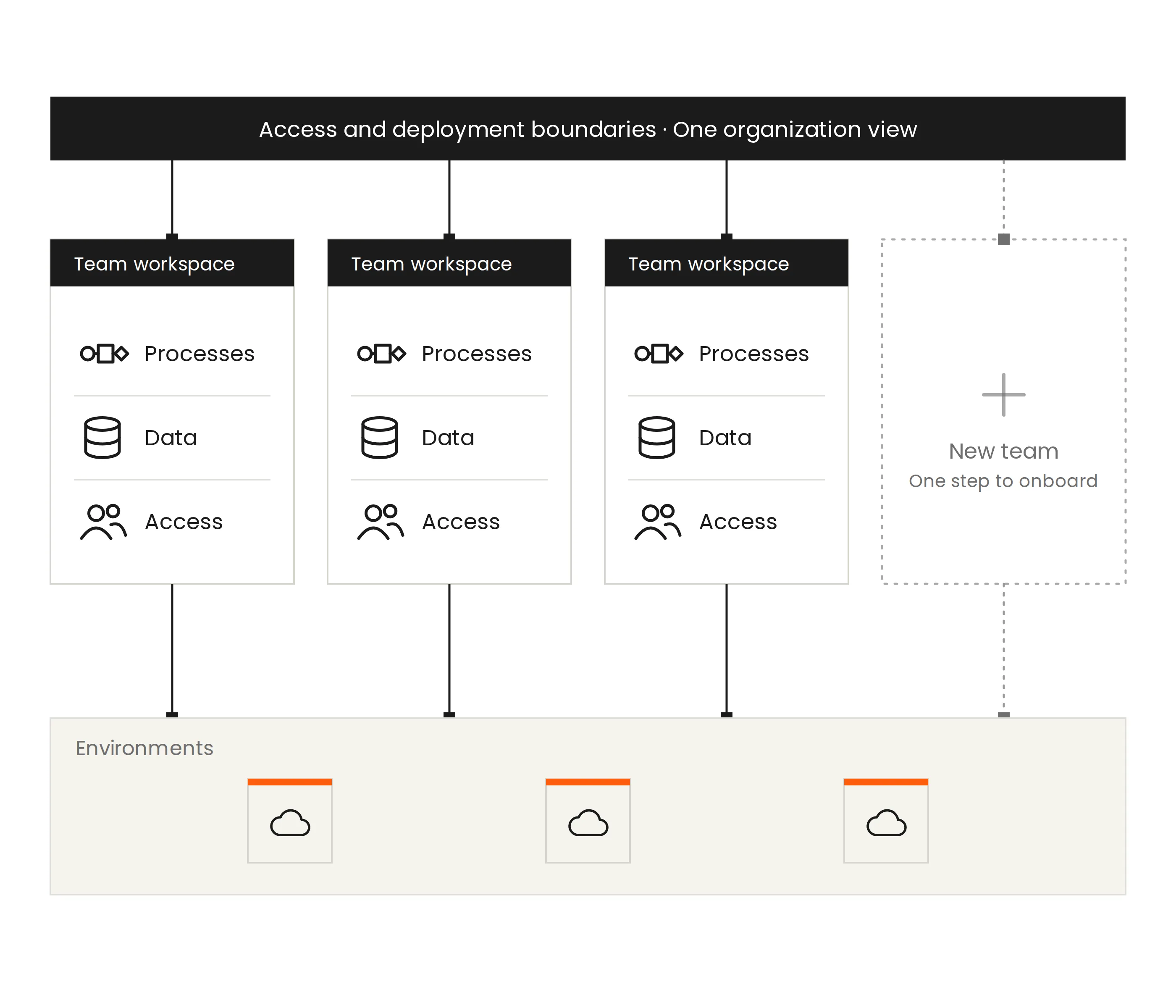
Each team gets its own workspace, separate from everyone else’s and connected to the environments it deploys to. The CoE defines access and deployment boundaries up front, so onboarding a team takes a single step.
- Bring new teams onto the platform quickly, so demand for automation doesn’t have to wait
- Let teams deploy on their own schedule within boundaries the CoE approved
- Share infrastructure safely, with each team’s processes, data, and access kept separate
- See what’s live, who owns it, and how every environment is running from one organization view
Build once, reuse everywhere
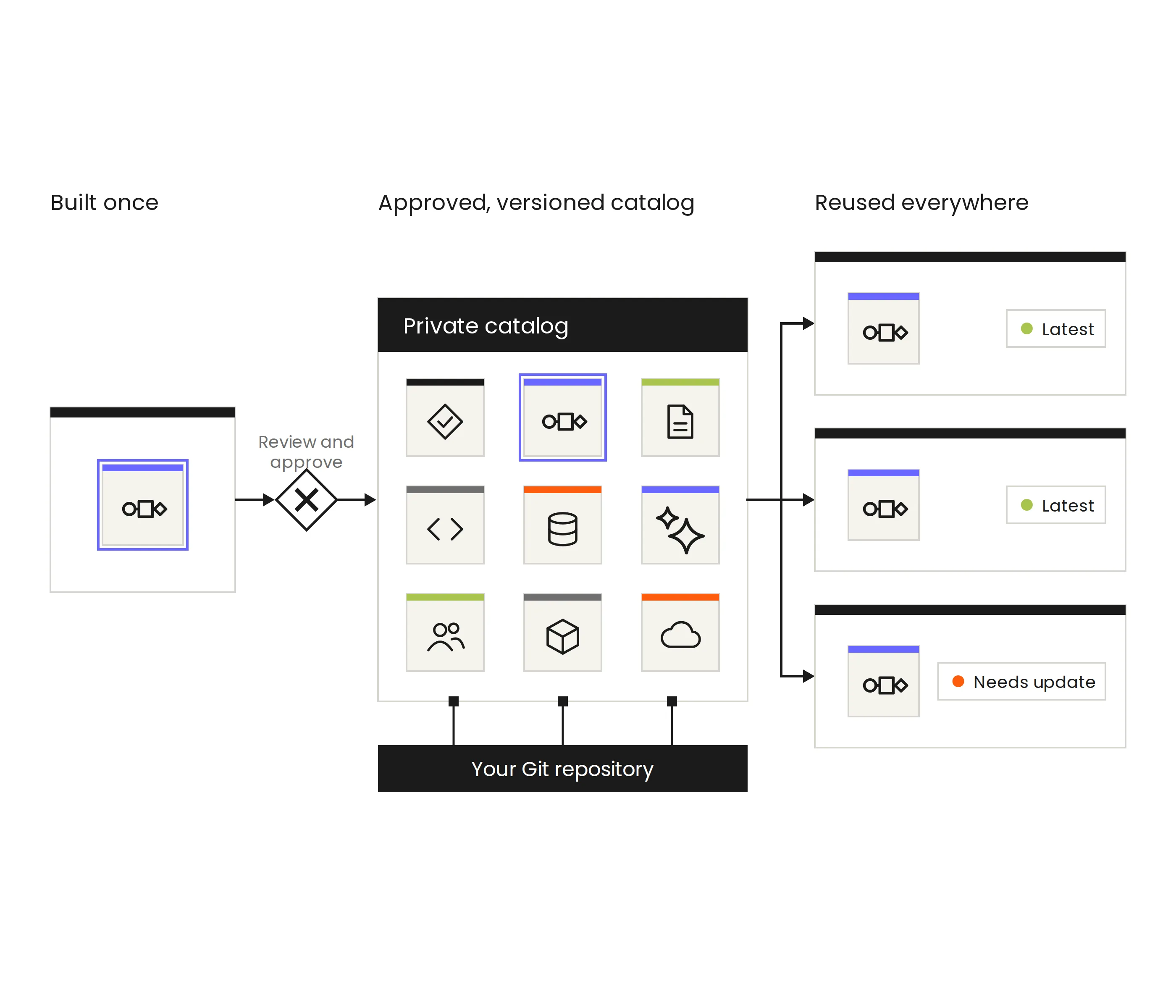
Your private catalog is your organization’s library of approved process assets. When one team builds something that works, every other team can find it, trust it, and put it to work in their own automation.
- Review and approve every asset before it enters the catalog, so teams only find vetted work
- Teams browse the catalog or search it from the modeling canvas, then add approved assets directly to their projects
- Assets live in your own Git repository, fitting into your source control and CI/CD practice
- Version status shows which teams run the latest approved version and which need an update
Structure Hub to your needs and policies
Organize workspaces by department, business line, region, or product domain. Each layer carries the controls that belong at that level, so the structure fits your operating model from the first team to the fiftieth.
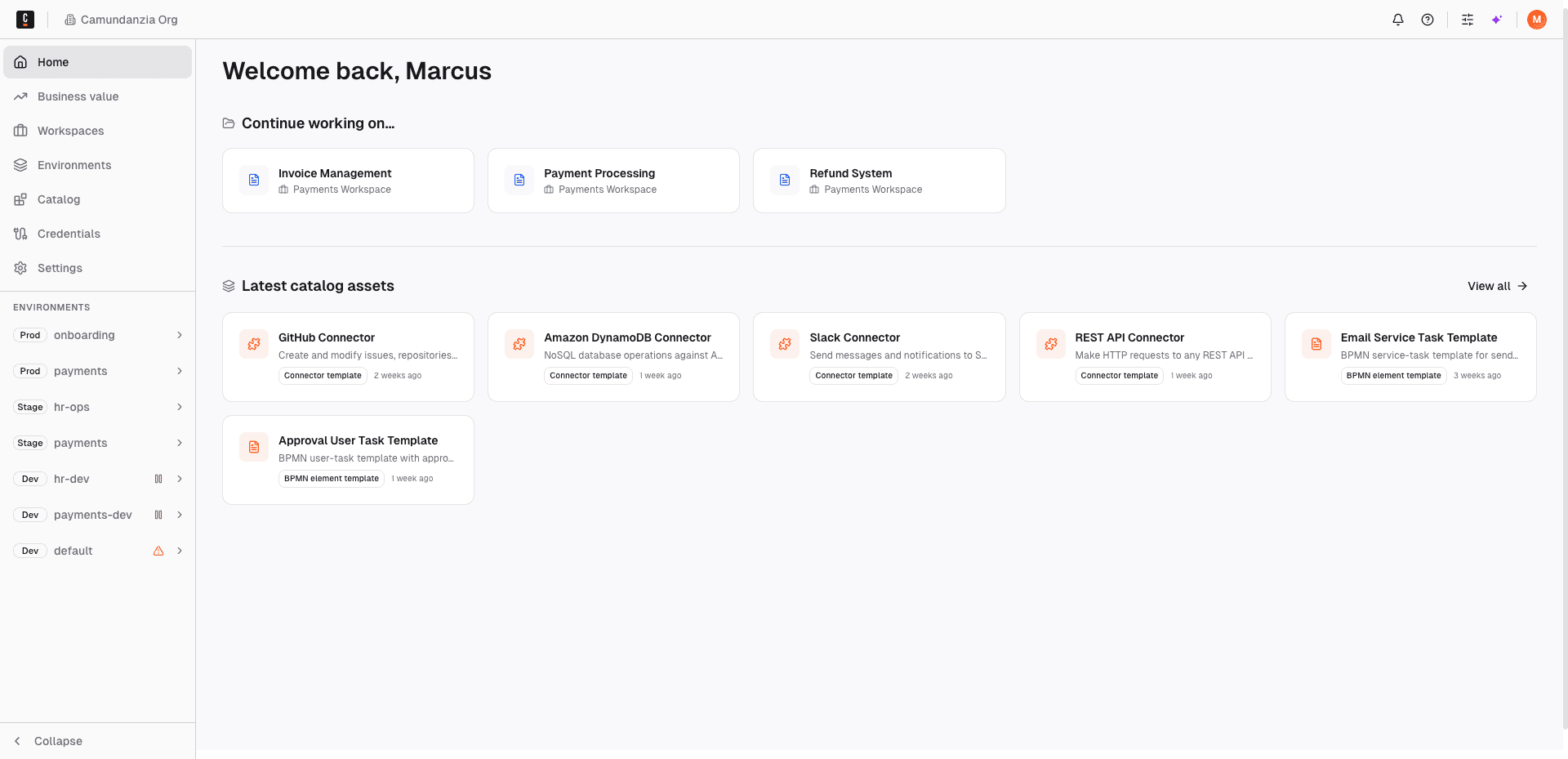
The top layer holds governance, environments, and the shared catalog for the whole company.
Faster delivery, more reuse, and measurable results from one platform
Workspaces
New teams start building in a single step with clear boundaries.
Catalog
Proven work becomes the shortcut to delivering new projects without rebuilding.
Impact dashboards
Track volume, automation rate, and SLA against the targets you care about.
Multi-tenancy
Run more teams on the infrastructure you already operate while processes, data, and access stay separate.
Control assets
Assets move through an approval flow that fits in your existing source control.
Organization view
One view gives a full picture of reusable assets, versions, and overall environment health.
What Hub changes for each role in the program
Automation programs run across a CoE, a platform team, and many delivery teams. Here is what Camunda Hub gives each of them.
Center of excellence and platform leaders
Scale innovation and stay in control
Say yes to every team that wants to automate, keep the standards and infrastructure under your control, and show leadership what the platform delivers.
Outcome
How Camunda Hub delivers it
New teams onboarded in a single step
Create a workspace, assign members and roles, and connect it to its environments inside boundaries you set once
One standard across every team
Your CoE approves process assets once in the catalog, and every workspace builds with them
Growth without another cluster to run
Teams share clusters that are already backed up, monitored, and on a known upgrade path
Isolation the runtime enforces
Logical tenant separation in SaaS, and physical tenants isolated at the engine level in Self-Managed
Business results you can report
The business value dashboard tracks volume, automation rate, and SLA adherence against targets
One view of the whole program
See every workspace, environment, and cluster, plus which teams run an outdated version of a shared asset
“One of the secrets to unlocking business value comes from scaled adoption. Teams are able to share resources, reusing elements and so on. The CoE approach is a key success factor to manage that. Accompanied by a lean governance.”

André Wickenhöfer, Head of Digital Transformation, IT Strategy & Architecture, Provinzial
Go deeper on scaling your value
View all resources


FAQ
What is Camunda Hub?
Camunda Hub is the design and management platform to run your Camunda fleet across many teams. Introduced in Camunda 8.10, Hub gives each team its own workspace, provides a governed catalog of approved assets to reuse, and gives leadership one view of what is running and the business results it delivers.Who is Camunda Hub for?
Camunda Hub is for organizations running automation across more than one team, especially those with a center of excellence or central platform team. CoE leaders use it to set standards and report business KPIs. Platform owners use it to onboard teams and control infrastructure while minimizing maintenance overhead. Delivery teams use it to build from approved assets and deploy on their own schedule. Organizations starting with one team can use Hub as their foundation from day one.How does Camunda Hub help a center of excellence scale automation without losing control?
Camunda Hub separates where governance happens from where work happens. The CoE sets access, deployment boundaries, and approved assets once at the organization level. Delivery teams build and deploy inside their own workspaces within those boundaries, so new teams add delivery capacity to the program without adding approval requests to the CoE.What is the Camunda Hub catalog?
The Catalog is a private, governed repository of reusable assets inside Camunda Hub. A CoE approves assets once, and every team in the organization can find and reuse them. In Camunda 8.10, the catalog supports element templates and connectors. Support for further asset types, including blueprints, follows in a later release.How do teams find and use assets in the Catalog?
Teams can browse the catalog directly or search and filter it by category from the modeling canvas when designing a process model. Once they find an approved asset, they add it to their project and use it in their BPMN process models. Every asset they find has already been reviewed and approved.How are assets approved for the Catalog?
Assets enter the catalog through a submit, review, and approve flow controlled by the CoE. The flow runs against your own Git repository, so review, versioning, and approval stay in source control, and your CI/CD pipeline publishes approved assets. Teams keep the review process they already use, with no separate approval step added on top.How is the Catalog different from Camunda Marketplace?
The catalog is private to your organization, while Camunda Marketplace is public. Marketplace lists assets anyone can import. The catalog holds only the assets your CoE has approved, and only people in your organization can see them.How does Camunda Hub keep teams and their data separate?
Camunda Hub separates teams in two ways. Workspaces and projects give each team its own members, roles, and environments. Multi-tenancy adds runtime isolation: in SaaS, tenants share a cluster while their processes, data, and access stay logically separated. In Self-Managed, physical tenants isolate teams at the engine level within a single orchestration cluster, for teams that need a firmer boundary.Does every team need its own Camunda cluster?
Not necessarily. With multi-tenancy in Camunda Hub, multiple teams can share a cluster while the runtime keeps their processes, data, and access separate. Adding a team becomes a provisioning step on infrastructure that is already backed up, monitored, and on a known upgrade path, which saves platform teams from operating a new environment for every department.We already use Camunda. Do we need to rebuild our projects for Camunda Hub?
No. Existing Web Modeler projects and process applications migrate into the Camunda Hub structure automatically, with no manual rebuild required.Is Camunda Hub available for both SaaS and Self-Managed?
Yes. Camunda Hub is available in both SaaS and Self-Managed deployments. Runtime isolation differs by deployment: SaaS uses logical tenant separation, and Self-Managed adds physical tenants for engine-level isolation. If you’re already using a previous version of Camunda, you’ll need to upgrade to 8.10 to gain access to the capabilities.