
Camunda Hub is coming, and it makes building automation clearer and more rewarding from day one. Hub gives every team a clean hierarchy, organization, then workspace, then project, so everyone knows exactly what belongs together. It is a strong foundation for building, sharing, and scaling your best work with confidence, and it is an exciting step in where the product is headed.
An Organization is the top-level container for governance, clusters, and your shared catalog. A Workspace is a domain or business area, say “Payments”, with its own members, roles, and assigned clusters. A project sits inside a workspace and holds one concrete solution: its process models, decision tables, forms, RPA scripts, connectors, and other assets, versioned and deployed together or separately as single files.
Workspaces are the part most teams will feel first. Each team gets an isolated collaboration container with its own members, roles, and clusters, instead of one shared, tangled project space. That isolation pays off three ways. Teams stay cleanly separated. Onboarding a team in Hub takes minutes. A Center of Excellence can spin up a new workspace and the team starts building right away. And because the shared catalog lets them reuse approved building blocks, modeling is faster and higher quality, which shortens the path to production. And the same model works identically whether you run Camunda as SaaS or Self-Managed.
We are not waiting for Hub to start delivering on this. In the 8.10 alpha 5 release, we will be shipping meaningful upgrades to process applications, because process applications are the basis for the future projects in Hub. When Hub lands, today's Web Modeler projects become Workspaces, and today's process applications become Projects. Getting process applications right now is what makes everything above possible.
Versioning grows up
The structure change is the headline, but the versioning is the real unlock, and it is what makes the new structure possible in the first place. You can still version a process application as one deployable bundle, exactly as before. Now you can also version a single file on its own. Every file saves automatically and keeps its own history, not just the application as a whole. And process application versions no longer drag element template versions along with them; you create one without touching the other.
Here is why that adds up to more than a list of features. A process application is no longer a rigid bundle you are locked into. Starting with 8.10-alpha5, you can use it as a bundle of assets that deploy together and Git sync as a unit, or simply as a plain container for loose files and folders, whichever fits the work in front of you. That is precisely why everything can now live inside a process application: being in one no longer forces bundle behavior on you, and it hands you versioning and auto-save you did not have before. Version comparison is sharper as well: it is obvious which files are unchanged, and you can diff any two versions side by side, not only consecutive ones.
If you have ever wanted to correct one file without shipping the entire application to do it, this is the release you have been waiting for.
What actually changes in Web Modeler August release (8.10-alpha5)
The new structure only pays off when your projects follow it, so existing content has to move onto the new model, and Camunda does that migration for you. It runs once rather than as a toggle because the system works on one structure at a time. This release reshapes what is already there into the cleaner hierarchy, automatically, so you start from the better layout.
You do not run the migration yourself. On SaaS it runs automatically during a scheduled maintenance window, with nothing for you to do. On Self-Managed it runs as part of upgrading to 8.10-alpha5, so the only step on your side is the upgrade itself (and, as always, taking a backup first).
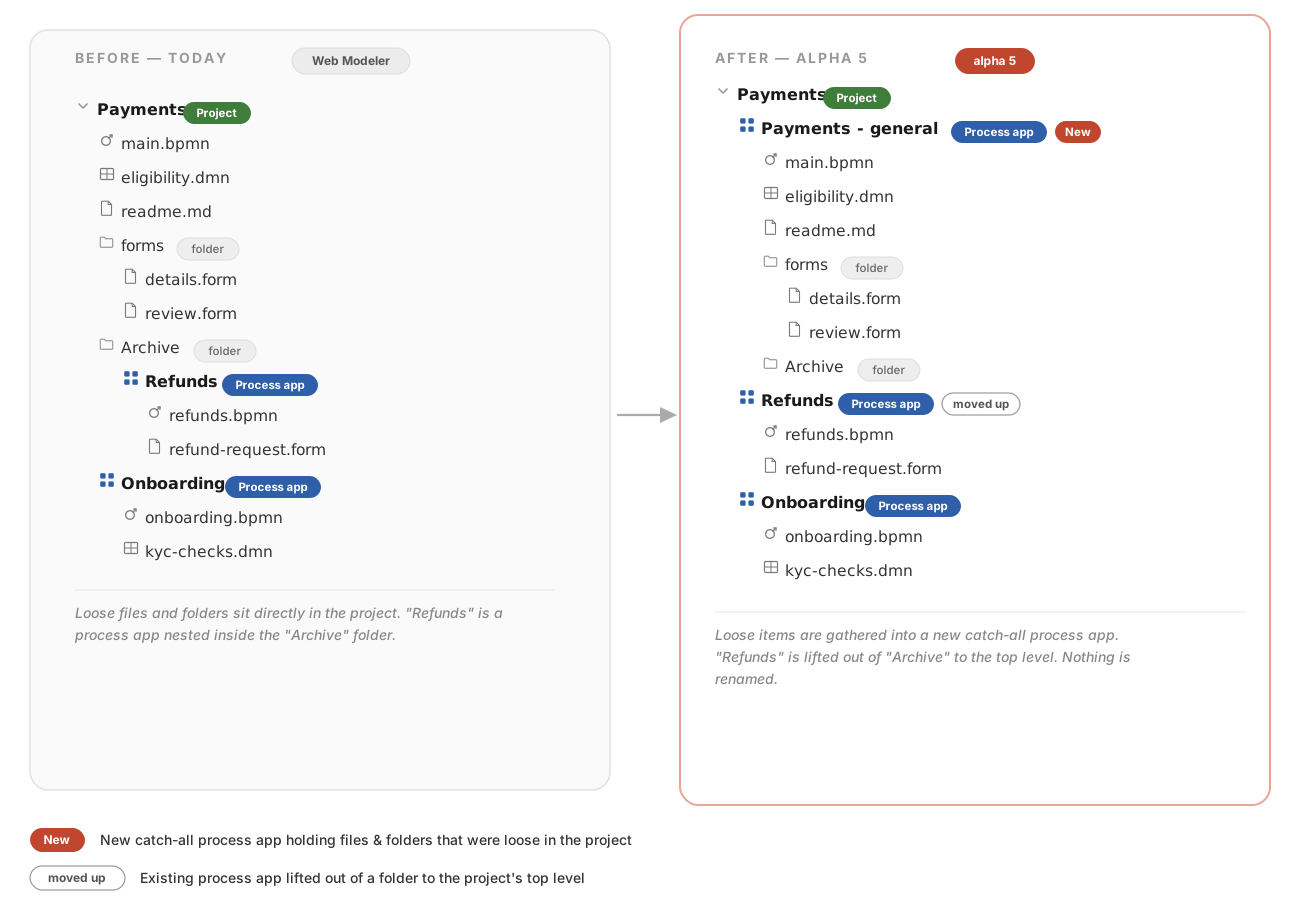
The rule is easy to hold in your head. A project directly contains process applications, and everything else, all other files and folders, lives inside a process application. No more process applications buried three folders deep. No more loose files floating at the project root.
To get there, the migration makes two automatic moves:
- Any process application nested inside a folder is lifted up to sit directly at the top level of its project.
- Any loose files or folders sitting directly in a project are grouped into a new process application named
<your project name> - General, so nothing is lost or orphaned.
Two reassurances matter here. First, your Git sync and cluster settings on existing process applications carry over untouched; they travel with the data. Second, nothing is renamed and the Modeler UI you use today does not change. Everything that existed before the migration still exists after it. It has simply moved to a clearer location.
One check before the window: the folder API
One practical caution. If you automate against the Web Modeler list-folders (V1) API, expect three shifts once content moves: reads and searches return files and folders from their new location, requests that create an item at a project's root land in the new <your project name> - General application (the response reflects that new parent), and the folder API stops returning process applications entirely.
If you have built automations that depend on where files and folders sit, review them ahead of the migration. The V2 APIs ship with 8.10 and are the path forward. Camunda is reaching out directly to the organizations most likely to be affected, but it is worth a look regardless.
Get your house in order
Nothing here asks anything of you right now. The migration runs on its own, your content is preserved, and your settings come along for the ride. Once it is done, you are free to reorganize further if you want to.
But do not treat this as mere housekeeping. A clean, predictable project structure with real versioning underneath is the foundation for scaling from one team to dozens with governed reuse, and it is the groundwork for Camunda Hub. Structure is not bureaucracy. It is the thing that lets you move fast later, without tripping over the choices you made when it was just you and a junk drawer.


