Author

Josh Wulf

Sep 10, 2020

Highlights from the Summer Hackdays 2020

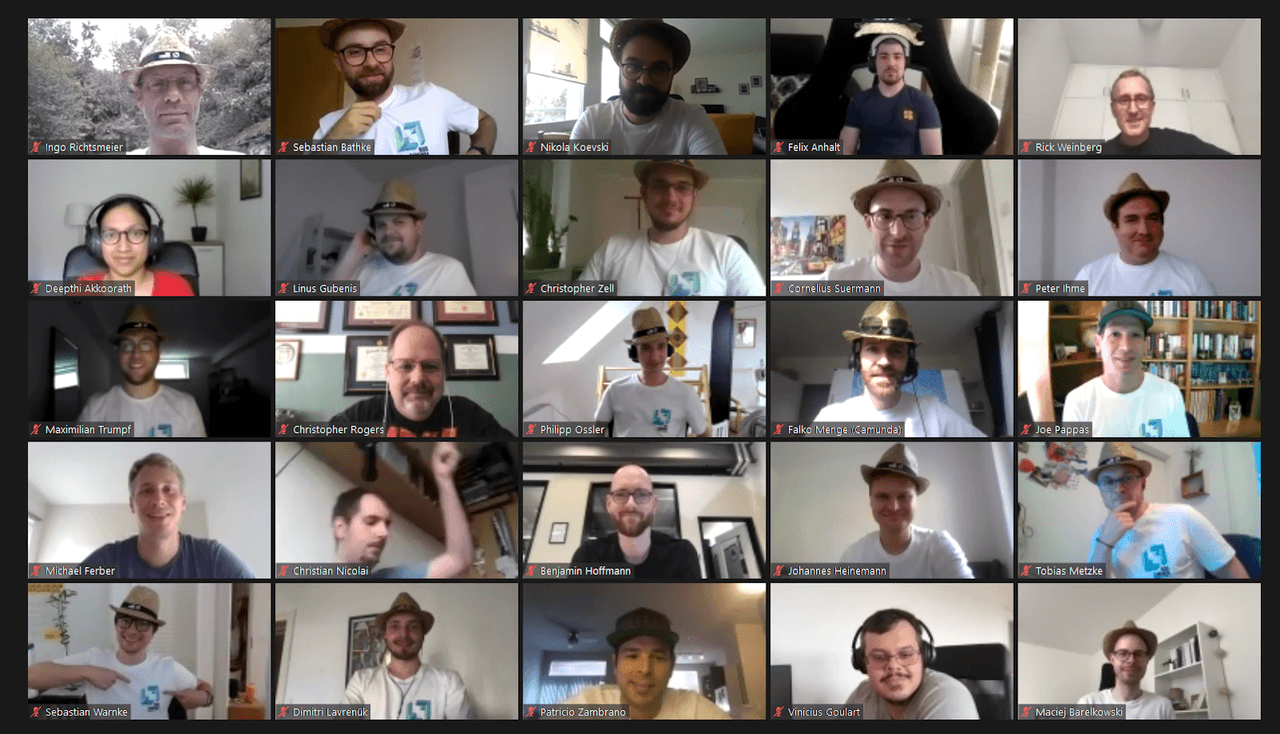
The Camunda hackdays are a wonderful time of year where the people in the company who like to code spend about three days working on their own fun passion projects, either in a team or by themselves. These projects have often become the catalyst for new features and community extensions. This year we had more people than ever joining for the hackdays and of course for the first time we did it fully remote! Supported by a lovely care package from the wonderful Camunda backoffice team. Hence all the lovely hats in the pictures below!  More than 20 teams gathered together. At the end of the three days we got to watch each team present their project. The kinds of…

By Niall Deehan, Josh Wulf

Using FEEL for Expressions – Part 1

Zeebe supports FEEL v1.11 – the “Friendly Enough Expression Language” – to express dynamic behavior in your processes. You can use FEEL expressions in a number of places in your BPMN models. From the Zeebe documentation: The following attributes of BPMN elements require an expression: Sequence Flow on an Exclusive Gateway: condition Message Catch Event / Receive Task: correlation key Multi-Instance Activity: input collection, output element Input/Output Variable Mappings: source Additionally, the following attributes of BPMN elements can define an expression optionally instead of a static value: Timer Catch Event: timer definition Message Catch Event / Receive Task: message name Service Task: job type, job retries Call Activity: process id Gateway The most obvious place that you use an expression…

By Josh Wulf

Git push to deploy to Camunda Cloud

Using the Zeebe Action for GitHub, you can automate your GitHub repo to deploy BPMN models to Camunda Cloud when you push to a specific branch. In this quick tutorial, I show you how to configure your GitHub repo to deploy all BPMN models in the bpmn directory of your repo on a push to master. If you don’t have a Camunda Cloud account yet, you can join the public beta to get one. Create a client in Camunda Cloud Go into your Zeebe cluster in the Camunda Cloud console, and create a new client. You might want to name it “GitHub-Automation” so you know what it is for. Copy the “Connection Info” block by clicking the copy icon in the lower right-hand…

By Josh Wulf

Writing a Zeebe Client in 2020

The last time we wrote about creating a Zeebe Client was in November, 2018 in the article “Generating a Zeebe-Python Client Stub in Less Than An Hour: A gRPC + Zeebe Tutorial“. As of June 18, 2020, we have Zeebe client libraries in Java and Go, maintained by the core Zeebe Engineering team, as well as community-supported clients in C#, Delphi, Node.js, Python, Ruby, and Rust; as well as Workit – a Node.js client that can talk to both Zeebe and Camunda – and a Zeebe GitHub Action. If you are interested in creating a new Zeebe client library in your favorite language, the 2018 article is still a great place to get started. In this article I want to…

By Josh Wulf
Announcing Zeebe Node Client 0.23

The 0.23.2 version of the Zeebe Node Client is out and available via NPM. There was a critical build error in 0.23.0 and 0.23.1. Special thanks to @myfjdthink for reporting it, and @lwille for the Pull Request that fixed it. The complete Change Log is at the end of this post, with the full list of known issues (for the first time in a release – there is one), breaking changes, new features and fixes. In this post, we’ll also feature a few of the major changes in this release in detail. Feature: Zeebe Node is now pure JavaScript Known Issue: Connection Error debouncing Fix: Transparent Reconnection after K8s pod reschedule Feature: Developer-friendly logging Feature: Batch Worker Version 0.23.0 Changelog…

By Josh Wulf

Complex multi-repo builds with GitHub Actions and Camunda Cloud

BLUF (Bottom-line Up-front): GitHub Actions are AWESOME and will change your life, but you risk losing yourself in a microservices architecture of repos, or have to go monolith once you get a few dependent projects or cross service provider boundaries – unless you orchestrate. I show you how I did it in this article. Get access to the Camunda Cloud Public Access Beta here. Use the Zeebe GitHub Action to orchestrate multi-repo builds with Zeebe and Camunda Cloud. In this article: Preamble What are GitHub Actions? GitHub Actions: The Good GitHub Actions: The Bad GitHub Actions: The Ugly Custom CI with GitHub Actions and Camunda Cloud Zeebe GitHub Action Modelling the problem / solution Starting a Camunda Cloud workflow from…

By Josh Wulf

Incident Alert Exporter

I took a break today from the article I’m working on about “Orchestrating GitHub Actions with Zeebe and Camunda Cloud” (stay tuned, because it is lit) to build an exporter for Zeebe, one that can alert you whenever an incident is raised – for example via Pushover, Pager Duty, or by calling you via the Twilio API. If you just want to see the code, it is on GitHub: Zeebe Incident Alerter. There are a couple of videos of the stream of me coding it at the end of the post if you want to see that. Using tutorials to write Zeebe extensions I followed a couple of tutorials from June last year to accomplish it – Writing a Zeebe…

By Josh Wulf

Going to Zero-Scale Zeebe on Camunda Cloud with Cloudflare Workers

I get questions about running Zeebe at “zero-scale”. That means workers that consume no resources when there are no tasks to perform. The Zeebe service on Camunda Cloud includes a generic HTTP-Worker that can be used to achieve this. The HTTP-Worker polls for jobs of type “Camunda-HTTP”, and then invokes a REST endpoint based on the HTTP verb and URL set in the task headers. If you are not on Camunda Cloud you can use zeebe-http-worker, or just write your own. In combination with “serverless” functions, this can be used to achieve a zero-scale architecture. Cloudflare workers are serverless processes that run in response to REST requests at the edge of Cloudflare’s hosting infrastructure. “At the edge” means that a…

By Josh Wulf

Try All Features of Camunda