Category

Getting Started

All Camunda blog posts tagged with Getting Started.

Automate manual tasks with Camunda and Trello

This article is the third in a series exploring fun, straightforward ways you can control workflows using Camunda Cloud — have a read of the others for some background if you’d like to see Camunda Cloud in action with Restzeebe, without a line of code: In the first two articles of this series you learned how to execute workflows, how to control the flow and take different paths depending on the context, and how workers execute their individual code in a task. These examples might have felt a bit too theoretical, so now I would like to present you with a use case: controlling manual tasks with to-do lists. Manual processes still exist, more often than you might think. For example,…

By Adam Urban

How can you Teach a Workflow to Execute a specific task?

If you read the first article in this series, I might have been able to convince you about executable processes? In this blog, the second in the series, I would like to go a step further and show you, with Restzeebe, how concrete tasks within processes are executed by a workflow engine. All my examples use Camunda Cloud. I don’t know of any other solution that executes workflows models in BPMN in the cloud. But now to the real thing. How can you teach a workflow to execute a specific task? I don’t want to go into too much detail, but with Camunda Cloud it works like this: Zeebe, the underlying engine, uses a PubSub system for workers. A worker is essentially the software that executes…

By Adam Urban

Refactoring an Actor Model System from Nact.io to Camunda Cloud

This month marks the 20th anniversary of the Open Source Erlang language and the Erlang virtual machine. Renowned for its reliability, the ability to hot-patch running code, and the Actor model, Erlang has been incredibly influential in software development, particularly in scalable distributed systems. If you look through the Zeebe source code, you’ll see Actor components sprinkled throughout. Zeebe core engineer Deepthi Akkoorath did her PhD thesis in Scalable Consistency in theMulti-core Era and is a huge fan of Erlang. Here is a video of Deepthi describing the architecture of Zeebe, the workflow engine powering Camunda Cloud: https://www.youtube.com/watch?v=JbXKgQQmukE A couple of months ago, I wrote a statistics collector for the Camunda DevRel team. You can see the project in the…

By Josh Wulf

Creating an Extraordinary Contributor Experience for Hacktoberfest

Hacktoberfest is coming! And Camunda is participating, with the opportunity to get a sweet limited-edition Camunda Hacktoberfest t-shirt by making just two pull requests to any of our open source projects. We’ve also put together a guide for open source repository maintainers, to empower you to create an extraordinary contributor experience. Creating an Extraordinary Contributor Experience This document is for open source project maintainers who want to increase community contributions to their project. We’ll look at the Contributor Experience and how you can create an Extraordinary Contributor Experience. So You’re a Maintainer You’re an open source project maintainer. You’re probably also a contributor to the project – maybe the only one. Wouldn’t it be great to have other people making…

By Josh Wulf

Using FEEL for Expressions – Part 1

Zeebe supports FEEL v1.11 – the “Friendly Enough Expression Language” – to express dynamic behavior in your processes. You can use FEEL expressions in a number of places in your BPMN models. From the Zeebe documentation: The following attributes of BPMN elements require an expression: Sequence Flow on an Exclusive Gateway: condition Message Catch Event / Receive Task: correlation key Multi-Instance Activity: input collection, output element Input/Output Variable Mappings: source Additionally, the following attributes of BPMN elements can define an expression optionally instead of a static value: Timer Catch Event: timer definition Message Catch Event / Receive Task: message name Service Task: job type, job retries Call Activity: process id Gateway The most obvious place that you use an expression…

By Josh Wulf

From Project to Program: Establishing a Center of Excellence

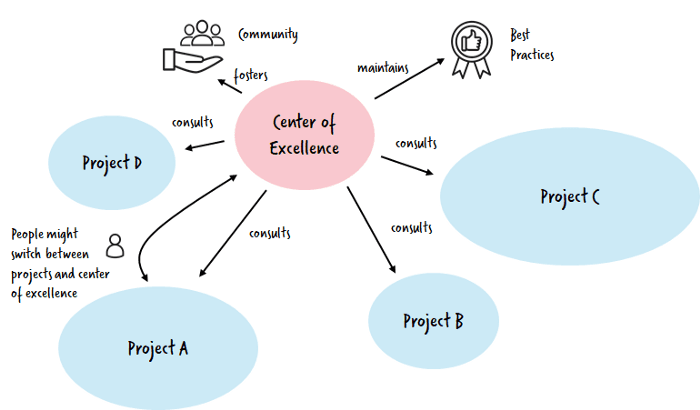
How can you move beyond your first Camunda project and automate hundreds of processes successfully using an agile step-by-step approach? For the last 10 years we’ve been helping businesses to automate workflow processes, migrating from monolithic systems into agile, scalable ways of working. And we’ve discovered that you don’t have to start with a big bang approach – in fact, starting small is the fastest and most effective route to digital transformation. You can catch up on the previous blogs in the series, if you’d like more background before diving straight into this blog, where we’ll look at how to establish and run a Center of Excellence, manage architectural decisions and manage perceptions around your projects. Establish a Center of…

By Bernd Ruecker

Git push to deploy to Camunda Cloud

Using the Zeebe Action for GitHub, you can automate your GitHub repo to deploy BPMN models to Camunda Cloud when you push to a specific branch. In this quick tutorial, I show you how to configure your GitHub repo to deploy all BPMN models in the bpmn directory of your repo on a push to master. If you don’t have a Camunda Cloud account yet, you can join the public beta to get one. Create a client in Camunda Cloud Go into your Zeebe cluster in the Camunda Cloud console, and create a new client. You might want to name it “GitHub-Automation” so you know what it is for. Copy the “Connection Info” block by clicking the copy icon in the lower right-hand…

By Josh Wulf

Try All Features of Camunda