

But what if you want to use JSON Variables without mapping to Java objects? With the next alpha release we will introduce a new ValueType “json” (and “xml” but that is an other story).
In this post I demonstrate how you can use the JSON value type to
- implement HTML Forms which work with a JSON Variable,
- implement BPMN Sequence Flow conditions based on the properties of the JSON Variable.
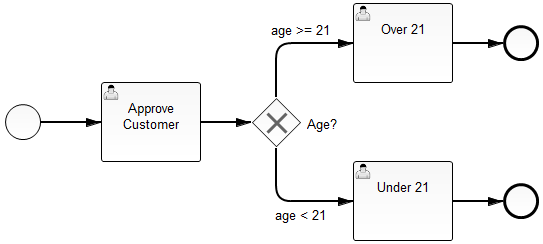
Example Process
Create a JSON variable in a start form
<form role="form" class="form-horizontal">
  <script cam-script type="text/form-script">

    var customer = $scope.customer = {};

    camForm.on('form-loaded', function () {
      // declare a 'json' variable 'customer'
      camForm.variableManager.createVariable({
        name: 'customer',
        type: 'json',
        value: customer
      });
    });

  </script>
  <div class="control-group">
    <label class="control-label" for="firstName">First Name</label>
    <div class="controls">
      <input id="firstName" class="form-control"
               type="text" ng-model="customer.firstName" required />
    </div>
  </div>

  <!-- Additional fields omitted -->

</form>
The custom java script creates a new object and binds it to the angular $scope of the form as a variable named customer. Then a new process variable named customer will be created when the form has been loaded successfully. The type of the process variable is set to json, so that the variable will be persisted simply as JSON without the need to deserialize it to a custom Java object.
The form itself is a plain angular form (see ng-model binding of input field).
Accessing an existing JSON variable in a task form
<form role="form" class="form-horizontal">
  <script cam-script type="text/form-script">

    camForm.on('form-loaded', function () {
      // tell the form SDK to fetch the json variable name 'customer'
      camFom.variableManager.fetchVariable('customer');
    });

    camForm.on('variable-fetched', function () {
      // work with the variable (bind it to current angular $scope)
      $scope.customer = camForm.variableManager.variableValue('customer');
    });

  </script>
  <div class="control-group">
    <label class="control-label" for="firstName">First Name</label>
    <div class="controls">
      <input id="firstName" class="form-control"
             type="text" ng-model="customer.firstName" required />
    </div>
  </div>

  <!-- Additional fields omitted -->

</form>
Accessing an existing JSON variable in an expressions
In the past you could already store JSON as variable values. However, you needed to store it as a String variable. The problem with that is that in a sequence flow you cannot easily write EL Expressions using the properties of the JSON if it is stored as a String.
In Camunda 7.2 we introduced Spin and it became possible to pare the String within El and use the Spin API for formulating conditions:
${ JSON(customer).prop("age").numberValue() >= 21}While this was a huge improvement the problem is that if you need to interpret the same variable as JSON multiple times within a command, it needs to be parsed multiple times (among other downsides).
Now that we introduce JSON variables as native ValueTypes, you can directly access the properties of a JSON variable in conditions:
<sequenceFlow id="SequenceFlow_4" name="age above 21"
    sourceRef="ExclusiveGateway_1" targetRef="UserTask_2">
  <conditionExpression xsi:type="tFormalExpression">
    <![CDATA[
      ${ customer.prop("age").numberValue() >= 21 }
    ]]>
  </conditionExpression>
</sequenceFlow>

<sequenceFlow id="SequenceFlow_5" name="age under 21"
    sourceRef="ExclusiveGateway_1" targetRef="UserTask_3">
  <conditionExpression xsi:type="tFormalExpression">
    <![CDATA[
      ${ customer.prop("age").numberValue() < 21 }
    ]]>
  </conditionExpression>
</sequenceFlow>
The example resources can be found in GitHub.