



AI copilots are everywhere these days—in your email, in your text editors, in your IDE, and, of course, Camunda Modeler! Copilots are virtual agents that use AI to help with whatever task you are working on. Most commonly, they help with search and writing tasks. In your email, AI copilots help complete sentences and can sometimes draft entire email replies. In software development, AI copilots help with code completion and can sometimes write entire scripts.
Camunda’s AI-powered copilots have several benefits:
- Increased productivity: Automates process model creation, reducing manual effort.
- Enhanced quality: Generates BPMN-compliant models that follow best practices.
- Faster development: Speeds up model creation, reducing the time traditionally required for process design, faster documentation.
- Boosted innovation: Handles initial model building, allowing teams to refine and optimize, so developers can focus on strategic problem-solving.
- Improved learning: Provides real-time guidance, helping developers and business analysts adopt best practices and discover new approaches.
The results aren’t perfect; more often than not, you need to make some changes to fit your exact needs. But that’s okay! The purpose isn’t to replace the human in the middle but to augment your work and speed up your development time. To maximize your use of copilots, it’s important to have an idea of what they are capable of.
So what are Camunda’s Copilots capable of? Let’s find out!
FEEL Copilot
FEEL—the Friendly Enough Expression Language—is designed to be approachable for those without a software engineering background. It’s used in many places throughout the design process: in DMN tables, in gateway evaluations, in most connectors, in form definitions, and more! It’s important to feel comfortable with FEEL (yes, the pun was on purpose!).
Last year, I wrote a blog post to introduce citizen developers to FEEL. I used the Marvel comics database to pull down some information about Spider-man and used FEEL to parse through the complex data set.
Can the FEEL Copilot do the same? (Spoiler alert: it can!!)
First, let’s look at the blog post. I wanted to take that complex data set from Marvel and simplify it down to a FEEL context that looks like this:
{
  “name”: string,
  “description”: string,
  “numberOfAvailableComics”: number,
  “topCreators”: string,
  “eventSummary”: list of contexts [ {
	“eventName”: string,
	“endedOrContinuing”: string
  } ]
}
Here’s the FEEL expression I manually created:
= {
  “name”: data.name,
  “description”: data.description,
  “numberOfAvailableComics”: data.comics.available,
  "topCreators": string join(
	sublist(
  	distinct values(
    	flatten(data.events.items.creators.items)[item.role = "writer"]
  	), 1, 5).name, ", "
  ),
  "topEvents": for event in data.events.items return {
	"eventName": event.title,
	"endedOrContinuing": if event.end != null then "Ended" else "Continuing"
  }
}
This is the prompt I gave the FEEL Copilot:
build a feel expression that creates a context that includes the name, description, the number of available comics, the top 5 creators of those comics, and a list of events that includes the event name and whether it is continuing or not
And here’s the result!
{
  "name": data.name,
  "description": data.description,
  "comicsAvailable": data.comics.available,
  "topCreators": sublist(distinct values(flatten(for c in data.events.items.comics.items return if c != null and c.creators != null then c.creators.items.name else [])), 1, 5),
  "events": for e in data.events.items return {
    "eventName": e.title,
    "isContinuing": if e.end = null or string(e.end) = "" then true else false
  }
}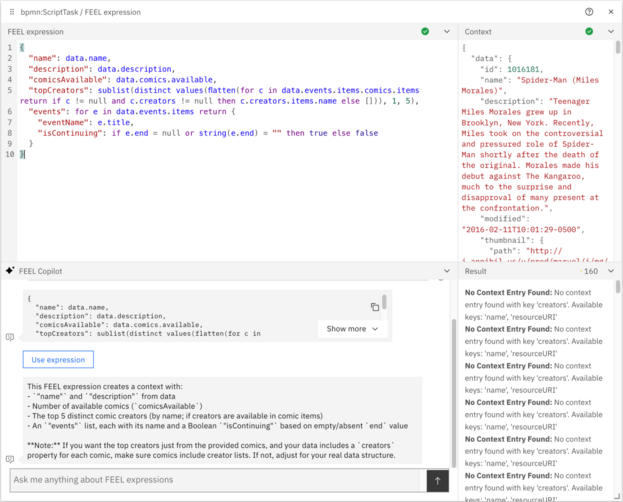
I did no further prompting or testing; this was the first result it gave me. Using sublist for the topCreators field is incorrect and will result in a list of NULL values (you can see the warnings in the Result panel in the screenshot), but it’s awfully close! I found this to be quite exciting; not only did it recreate almost exactly the expression I had hand written, it did so without giving the Copilot an example of the output.
I decided to iterate on this to see if the Copilot could fix the broken part of the expression. My first attempt didn’t change the result, so I added more information about the context in the prompt:
the “topCreators” part of the expression is giving a lot of “no context entry found” errors. try a different approach for “topCreators”. the creators can be found in the path data.events.items.creators.items. it should also be filtered by the role of “writer”
FEEL Copilot generated this expression, which isn’t quite as elegant as the final solution in my original blog post, but it is a functional expression that gets the same result!
{
  "name": data.name,
  "description": data.description,
  "comicsAvailable": data.comics.available,
  "topCreators": sublist(
    distinct values(
      flatten(
        for e in data.events.items return
          if e.creators != null and e.creators.items != null
            then for c in e.creators.items return if lower case(c.role) = "writer" then c.name else null
            else []
      )
    )[item != null],
    1,
    5
  ),
  "events": for e in data.events.items return {
    "eventName": e.title,
    "isContinuing": if e.end = null or string(e.end) = "" then true else false
  }
}
BPMN Copilot
This is the fun part. If you’ve read this far, get ready for the good stuff!

Naturally, BPMN Copilot can turn a natural language prompt into a BPMN model. That’s table stakes for something called BPMN Copilot. As with all AI and prompt engineering, the more specific you can be in your prompt, the better the output will be. As shown in the GIF above, the basic prompt “build a simple process for applying for a mortgage” generated a very basic model.
BPMN Copilot can iterate on existing models, also. I wasn’t satisfied with the basic process and thought it needed a DMN table and a sprinkle of AI. I asked Copilot to add an AI task that reviews the initial application, as well as inserting a DMN table to check their credit score. This was the result:

That’s great, but again feels like the bare minimum needed for this Copilot. What else can it do? Let’s take a quick look at two of my favorite capabilities of BPMN Copilot!
Explaining process models
One of my favorite features of BPMN Copilot is its ability to explain a process model in easy to understand terms. I loaded Camunda’s AI Email Support Agent blueprint and gave the Copilot a very simple prompt:
explain this process in easy to understand terms
And here is the explanation of how the AI Email Support Agent blueprint works!
This process represents an automated customer support system for handling loan-related inquiries. Here’s a simplified explanation:
1. The process starts when a customer email is received.
2. The system loads past conversations with the customer for context.
3. An AI agent handles the customer request, using various tools like querying a knowledge base or asking a specialist if needed.
4. The agent’s response is evaluated by another AI system (Agent as a Judge).
5. Based on the evaluation:
– If the response is satisfactory, a final email is sent to the customer.
– If it needs review, a human checks it before sending.
– If human intervention is required, the case is escalated.
6. The process ends with either the case being solved or handed over to a human for resolution.
7. Throughout the process, customer interactions are saved in long-term memory for future reference.
This automated system aims to efficiently handle loan-related inquiries while ensuring quality responses and escalating complex cases when necessary.
Some details are missing, but I asked for an easy to understand explanation, and it delivered. I’ll leave it to you to experiment further… What if you ask it to provide a more detailed explanation? Here’s one prompt idea to get you started:
now give me a very detailed explanation of the process that includes explanations of the different tools inside the ad-hoc sub-process
Generating models from code
My second favorite feature of BPMN Copilot is the ability to translate code into BPMN models. Some applications already have existing workflows built into the code. Those workflows often have limitations: they are tightly coupled with the code and often face issues with scaling. Those complications are reasons that enterprises begin investigating process orchestration platforms, so having the ability to transform code into BPMN is a very handy trick.
It would take far too much space in this post to share all of the code; please click here to view the sample files on GitHub.
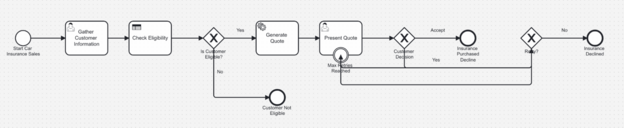
This process model was generated from some COBOL code!
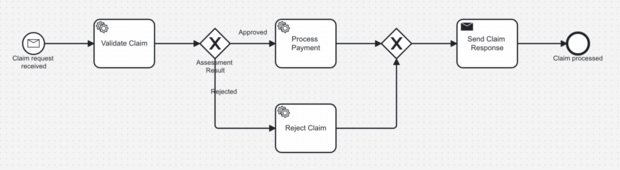
And this one was generated from an IBM BPEL model:
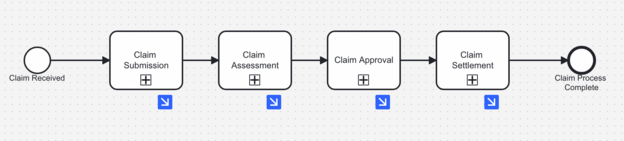
And, of course, it can assist with migrating from other platforms such as PEGA:
Conclusion
I hope you enjoyed this brief tour of what Camunda’s Copilots are capable of. If you have any best practices or fun experiments you’ve done with Camunda Copilots, please share them on the forum or in the comments. I look forward to seeing your results.
If you’re interested in what other AI capabilities Camunda has to offer, here are a few links I think are worth checking out:
Start the discussion at forum.camunda.io