


We’re excited to share that the latest alpha of Camunda is now live and available for download. For our SaaS customers who are up to date, you may have already noticed some of these features as we make them available for you automatically.
Below is a summary of everything new in Camunda for September 2025 with the 8.8.0 alpha8 release.
Table of contents
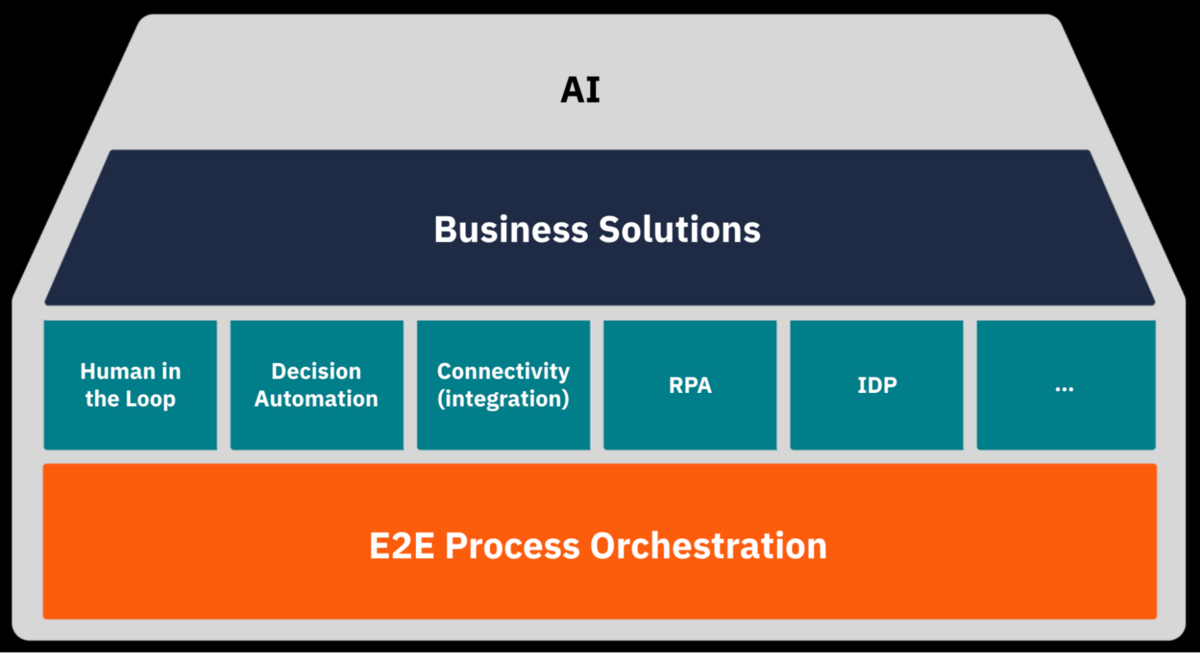
This blog is organized using the following product house, with E2E Process Orchestration at the foundation and our product components represented by the building bricks. This organization allows us to organize the components to highlight how we believe Camunda builds the best infrastructure for your processes, with a strong foundation of orchestration and AI thoughtfully infused throughout.
E2E Process Orchestration
This section will update you on the components that make up Camunda’s foundation, including the underlying engine, platform operations, security, and API.
Zeebe
Our engineers focused on big fixes for this release. We hope you enjoy everything in the latest Zeebe 8.8.0-alpha8 release.
Operate
For this alpha release, we have added more functionality to our process instance migration capabilities with the ability to map sequence flows flowing to the joining gateway like parallel or inclusive gateways. With this support, you can explicitly map each “taken” path through a join to ensure the migrated instance arrives in the correct branch of the new process.
In addition to providing this new feature, we completed bug fixes in this release.
We hope you enjoy everything in the latest Operate 8.8.0-alpha8 release.
Tasklist
For this release, our Tasklist engineering team worked on bug fixes. We hope you enjoy everything in the latest Tasklist 8.8.0-alpha8 release.
Web Modeler
We have several enhancements for Web Modeler with this release.
Oracle Database and Microsoft SQL Server (MSSQL) RDBMS support
Web Modeler Self-Managed now supports Oracle Database and Microsoft SQL Server. This simplifies the Self-Managed set-up process, reduces maintenance efforts, and requires less expertise to maintain the platform.
Element template support for all tasks
Now, within the Web Modeler properties panel, you can save elements as a template using the “Save as element template” feature.

With a task selected, you now can:
- Save a configured task—a service task, user task, send task, receive task, business rule task, script task, or a call activity—as a reusable element template.
- Edit and fine-tune saved templates via the element template editor: modify input/output bindings, validation rules, categories/groups, and more.
- Publish templates to your project or organization, making them available for teammates to apply to new or existing tasks.
If you want more information on this topic, please see our latest blog post entitled “Build Once, Deploy Everywhere: Reuse Element & Connector Templates to Deploy Standardized Processes.”
Expanded support for element template bindings
This release also provides expanded support for element template bindings with the following additions:
- Element templates now support
zeebe:assignmentDefinition, allowing authors to define task assignee(s) and/or candidate groups directly in templates. - Support for
zeebe:priorityDefinition, enabling template authors to include a task priority value (an integer 0–100 or a FEEL expression). - Added
zeebe:taskSchedulebinding support, so you can template a task scheduling configuration for user tasks.
CI/CD Guide for Building Blocks
To support scalable reuse of building blocks, we’ve significantly improved our Element templates documentation, with a special focus on CI/CD practices for managing templates across teams and environments. We documented how element templates and their dependencies can be integrated into CI/CD pipelines, enabling more reliable, maintainable, and automated reuse at scale.
Alongside the new CI/CD guidance, we’ve restructured the Element templates documentation to improve discoverability and usability. The content is now tool-agnostic, with dedicated guidance for Web Modeler, detailed instructions for managing dependencies, and a setup guide for local development environments. We’ve also consolidated relevant information previously found under the Connectors section into the new Element templates section.
These updates aim to empower CoEs and development teams with the tools and practices needed to scale template-driven development efficiently and with confidence.
Test scenario files
You can define shareable, low-code tests for your BPMN processes with test scenario files. The Test scenario files are persisted test definitions for Web Modeler as reusable building blocks with the following features:
- You can create, update and manage test scenarios from Play.
- You can open linked test scenario files in your Web Modeler project to fine-tune your scenarios.
- Process developers and analysts can now easily save, export, and share test scenarios.
- These new test files are portable and Git-syncable, and can be used to rapidly create Camunda Process Test-based files.
We hope you enjoy everything in the latest Web Modeler 8.8.0-alpha8 release!
Desktop Modeler
Enhanced BPMN ad-hoc sub-process support
With this release, you can now configure new ad-hoc sub-process properties such as output collection and implementation as a job worker.
Support for deployment using new orchestration cluster REST API
The Desktop Modeler now supports deploying through the new Orchestration Cluster REST API.
Enhanced FEEL expression editing
The Desktop Modeler now supports multiline FEEL strings and provides clearer errors for unclosed string literals.
We hope you enjoy the latest Desktop Modeler release.
Optimize
For this release, our engineers focused on bug fixes.
Installation Options
This section gives updates on our installation options and various supported software components.
SaaS provisioning
With this release, we have expanded SaaS provisioning to include the following:
- We have enhanced disaster recovery to ensure business continuity by enabling automatic backups of the orchestration clusters to a secondary AWS or GCP region. This significantly reduces downtime in the event of regional disruptions.
- We now offer dual backup provisioning in the GCP London region.
Self-Managed
Users can now deploy Camunda Console using Docker images, enabling seamless installation on platforms that do not use Kubernetes. This allows Console to run via Docker Compose or alternative container orchestration services such as Podman or Amazon ECS.
We have also enhanced a new, standardized format for secrets and keys that supports both production and non-production cases in the Helm values.yaml file.
Task Automation Components
In this section, you can find information related to the components that allow you to build and automate your processes including our modelers and connectors.
Connectors
We have added functionality to our connectors with this release including:
- The Camunda database connector now supports Oracle Database and custom JDBC drivers in general. Details on how to set up a custom JDBC driver can be found here.
- The connector runtime now supports disabling individual connectors using environment variables.
- We are extending our support for the new experimental functional style of defining outbound connectors. The runtime now supports the
@Headerannotation to bind a job header to a connector input. - We have included bug fixes and internal refactorings. You can refer to the release notes for the full list.
We hope you enjoy everything in the latest Connectors 8.8.0-alpha8 release right here.
Intelligent document processing (IDP)
IDP support for multiple AI providers
We’re excited to announce a major step forward for Intelligent Document Processing (IDP) in Camunda: support for multiple AI providers. Now, in addition to AWS, you can now configure GCP and Azure connections, making it easier to leverage the models already available through your preferred cloud provider.
This means that organizations without an AWS subscription can still take advantage of Camunda’s IDP by using their existing GCP or Azure accounts. And if your company uses more than one provider, you can configure multiple connections and access all available models across them, maximizing flexibility and choice.

At this stage, IDP supports:
- Unstructured extraction templates: AWS, GCP, Azure
- Structured extraction templates: AWS, GCP
We’re actively working to expand the list of supported providers and use cases, so stay tuned for more updates.
Business Application Integrations
In this section, we provide release details for our various Business Application Integrations and product integrations.
ServiceNow Integration
We now have an alpha version of our ServiceNow integration available on request. This integration consists of a Camunda Spoke that is usable in ServiceNow Flows and Camunda connectors.
If you are interested in this integration, please reach out to your Camunda sales representative or customer success manager.
Artificial Intelligence
AI Agent blueprint
With a continued focus on AI, this section provides information about the continued support of AI in our product components.
We have created a new step-by-step getting started guide on how to build your first AI Agent using a new blueprint on Camunda Marketplace. Take a look and see if you can implement your first AI Agent.
Camunda 7 to 8 Data Migrator
We are happy to announce the next alpha release of the Camunda 7 to 8 Data Migrator 0.1.0-alpha6. This release comes with the following improvements:
- History Migrator (experimental feature for 8.8)
- Users can now migrate a broader range of historical data, including DMN.
- We have added listing and filtering for skipped entities by specific types (e.g.,
HISTORY_PROCESS_INSTANCE, HISTORY_USER_TASK).
- The default configuration is now more security-wise.
- We have added new documentation for the Camunda 7 to 8 Data Migrator. Check it out here.
Thank you
We hope you enjoy our latest minor release updates! For more details, be sure to review the latest release notes as well. If you have any feedback or thoughts, please feel free to contact us or let us know on our forum.
If you don’t have an account, you can try out the latest version today with a free trial.
Start the discussion at forum.camunda.io