



Welcome to the fourth blog in our series around designing AI agents in Camunda. In this blog we will be addressing using the AI Agent Sub-process connector for implementing agentic AI in your Camunda process.
Be sure to read the first three (3) blogs in the series before reading this one.
- Two Connectors, Three Patterns, and One Model for Designing AI Agents in Camunda
- Designing AI Agents in Camunda: The AI Agent Task connector Standing Alone
- Designing AI Agents in Camunda: The AI Agent Task Connector with Loop
Pattern 3: AI Agent Sub-process connector
Description: The third and final pattern in our series uses an AI Agent Sub-process connector. The brains for this connector are placed at the sub-process connector task with at least one activity inside the sub-process. The job worker implements the agent’s reasoning and tool loop internally, chooses which tool to call next to achieve the goal, and loops dynamically.
Strong use cases: When you have multiple tool goals where autonomy trumps micro-governance, this pattern is for you. Essentially, you need to automate several tasks that will run dynamically. For example, automatically sorting or sending replies to inquiries as first line responses to free up customer service representatives to deal with more complex inquiries. This pattern is ideal for dynamic processes letting the agent decide what tasks to execute based on previous output or context.
This pattern is a bit cleaner and easier to govern than the previous pattern with the looping ad-hoc sub-process, so it is an excellent choice for teams that value a clean model and fast setup.
Poor use cases: This is not a good option if you require granular audit trails and governance as might be required with highly regulated industries.
Strengths: The strength of this pattern is its simplicity and throughput. The configuration is a bit lighter with a self-contained environment for AI agent operations, so the model stays clean. The AI agent can dynamically orchestrate tool calling and request handling, supporting autonomous multi-step execution within end-to-end processes. When autonomy and a readable diagram are more important than micro-governance, start with this pattern.
You also have the option with this pattern to use event sub-processes inside the agent to handle timeouts, cancels, or escalations.
Weaknesses: The trade-off is less granular control over each tool call. You will need to lean more on connector logs, variables, and external telemetry to achieve deep traces. It also might be a bit overkill for simpler AI interactions. Debugging the agent behavior might be a bit tricker since multiple tasks are executed autonomously within a single sub-process.
Example usage
In this example, a policy holder has requested some changes to their current policy. Based on what changes have been requested, the AI Agent Sub-process connector will execute the correct tools to make all the required changes and also run some additional tools to set the stage for later steps in the process.
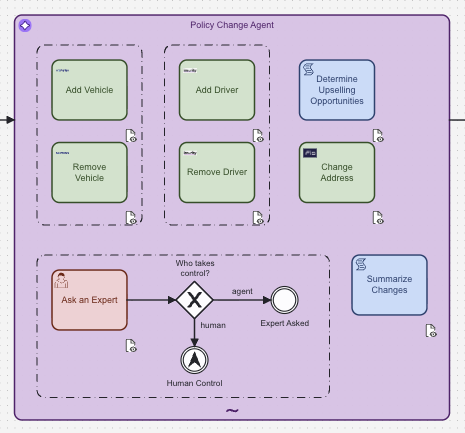
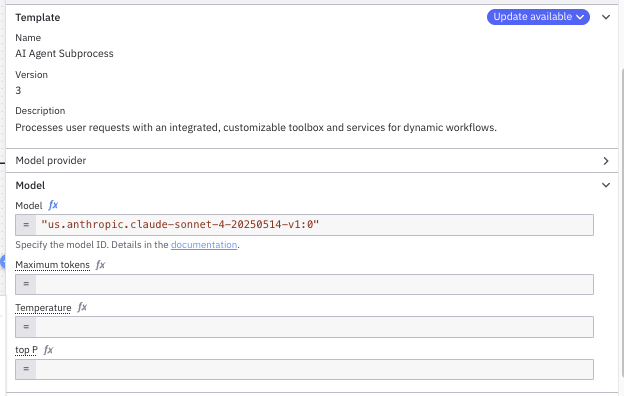
For this pattern, all the intelligence for the agent is configured at the sub-process level. Just like the previous patterns, you need to select the proper LLM to use for your agent.
You need to configure your system and user prompt. In this case, we are displaying the generic prompt provided in the template for the AI Agent Sub-process connector that should be changed to reflect your required instructions.

For this example, we created a user prompt, userPrompt, using a script task which is then used in the configuration for the AI Agent Sub-process connector as shown below.
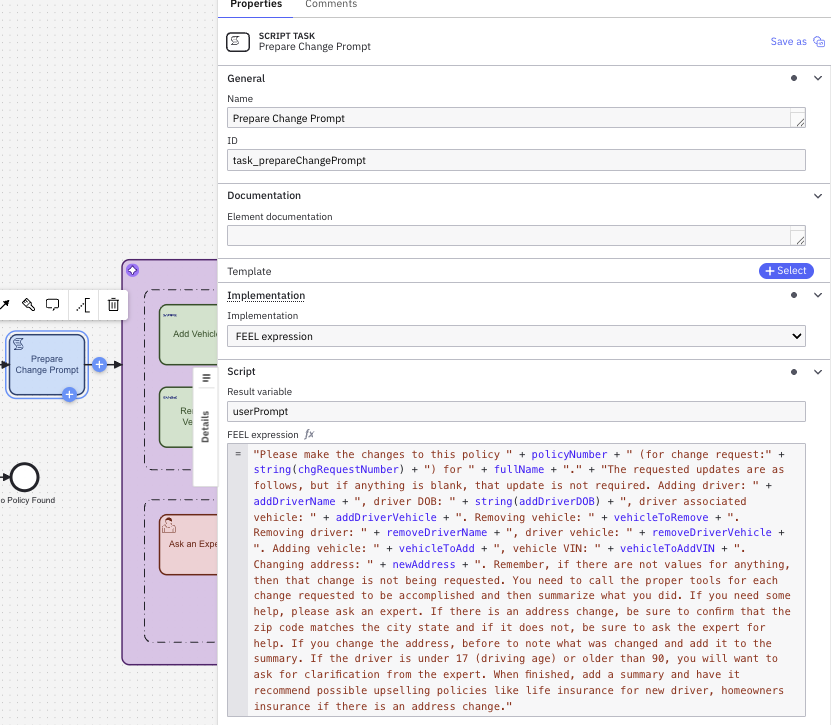
The resulting userPrompt variable is then used as the user prompt for the agent.

With this AI Agent connector, you have some additional control in how things behave as it relates to event handling. You can set this to wait for results or to interrupt the tool calls. This is not an option with the other patterns.

You can also add more context to the response by including the agent context in the results.

As we look at the process instance when it runs, we notice that Camunda Operate does capture all the individual tools within the sub-process as denoted at the #innerInstance for the agent_policyChange sub-process.

The process instance image highlights the tools that were executed by showing them with a blue outline. If we select one of the tool runs, we will get the information for that tool call. Below you can see the task_addDriver as well as the task_addVehicle tools.


As you can see, you still have significant details for every tool accessed by the AI Agent Sub-process connector pattern shown in this example; however, not the granularity provided with the previous pattern, the AI Agent Task connector with ad-hoc sub-process loop.
Understanding when to use the AI Agent Sub-process connector
This pattern is a clean, self-contained agent that provides the dynamic tool call to handle requests. With the added strength of using event sub-processes (not depicted in our example), this pattern is excellent for handling timeouts, cancels, or escalations. Be sure to check out our documentation for more information.
Next up
Be sure to check out our final blog in the series, which summarizes and compares the patterns as well as demonstrates them all running in the same process.
Start the discussion at forum.camunda.io