


In January, Camunda released Camunda 8.9-alpha3, and we have some highlights to share about that release. For a list of all items included in the release, we encourage you to check out our release notes.
This alpha was all about faster migrations, safe changes, and a cleaner developer experience. Camunda 8.9.0‑alpha3 levels up agentic orchestration with practical controls, including AWS Bedrock API key authentication, per-model timeouts, and query-parameterized OpenAI-compatible endpoints. All this while cutting friction in delivery through a streamlined Camunda 8 Run, cluster-wide metrics, and configuration that can be centralized and reused.
Camunda rounds out this alpha release with enterprise guardrails by means of global user-task listeners, Modeler improvements, process-instance migration for ad-hoc subprocesses, and production-grade storage options, including Aurora and any RDBMS via Helm.
Let’s take a deeper look.
Templating support for timer events with Web Modeler
It is common when creating process models across environments to use the same timer settings. With this release, you can now create, discover, and apply templates for timer events directly in Web Modeler.
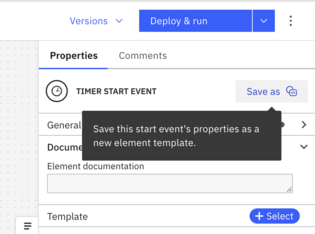
You can easily save a timer from a diagram as a reusable template.
Alternatively, you can define one using element templates and share it across your project or workspace.
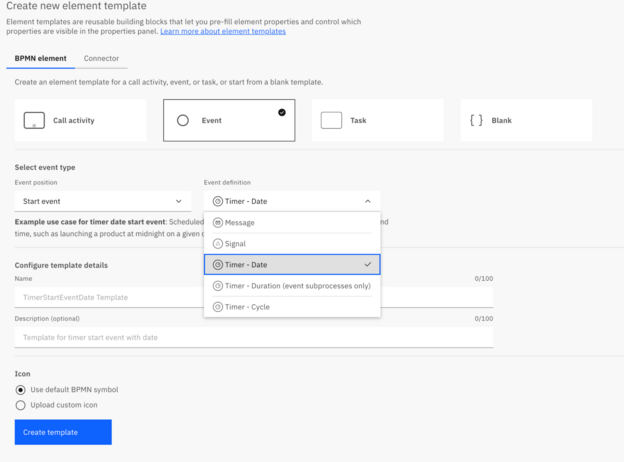
Reusable Timer element templates standardize SLA semantics and time handling across teams. This enables escalations to fire consistently and ensures that KPIs are comparable and audits move faster. Publishing an org‑approved timer template reduces modeling errors and onboarding time, stresses standards, and lets you change defaults once and roll them out across projects without hunt‑and‑replace.
GitHub apps in outbound GitHub connector
Previously, the GitHub connector required personal access tokens (PATs), which tie process actions to a single user identity, centralizes token control with that user, and limits security to coarse-grained permissions.
However, when interacting with GitHub, you must have dedicated accounts to ensure that GitHub actions are attributed to a controlled, organization-managed identity, not an individual employee. This improves auditability and continuity when roles change. It also enables least-privilege access and centralized governance, reducing risk compared to personal tokens that are owned and managed by a single user.
GitHub Apps can operate as an independent entity, can be managed per-organization, and have fine-grained permissions. This change allows enterprises to adopt the out-of-the-box GitHub connector without compromising their enterprise controls.
So, with this release, we have updated our outbound GitHub connectors to allow for authentication via GitHub Apps. The connector’s element template hides the JSON web token (JWT) and installation‑token flow via an intrinsic function that exchanges your App certificate for a short‑lived token.
This new approach aligns with least‑privilege and makes audit trails clearer: actions come from the App identity, not a user PAT. Rotations are centralized and automated.
Desktop Modeler connection manager
Previously, Desktop Modeler remembered only the last connection configuration, which creates issues including overwriting the connection context. This affected Modeler features that needed an active connection, including deployments, starting instances, and task testing. Essentially, the moment that you switch clusters, your previous configuration is gone. Users should be able to switch between configurations in order to use cluster-related features seamlessly without having to reenter the connection details, losing the original configuration at the same time.
So, with the 8.9-alpha3 release, we are providing the connection manager to manage your connections directly in Desktop Modeler. You can now:
- Add, edit, delete, and save multiple connections.
- Securely store credentials and connection settings.
- Deploy directly to saved connections.
- Select an existing Orchestration Cluster or add a new one during deployment.
Now you can configure your connection one time and reuse it for any Desktop Modeler feature that requires an active connection.

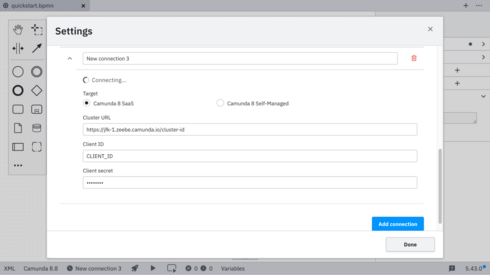
You can create and store multiple connections using these settings and then switch between connections directly from the status bar. This approach streamlines the deployment workflow and reduces setup friction.
Global user task listeners for the orchestration cluster (Self‑Managed)
User tasks connect process automation with humans. Modeling many of them one-by-one creates a proliferation of listeners for each task, which becomes hard to maintain. In regulated environments, it can become a governance problem. And during Camunda 7 migrations, it can become a blocker.
Listeners must be manually added and maintained on each individual user task, but that approach creates predictable pain:
- It’s error-prone. It’s easy to miss a task or apply the wrong version of a listener.
- It can cause configuration drift. Processes evolve over time and listeners can get out of sync across teams and repositories.
- It can slow migration. It adds a large, risky scope of model edits.
But regulated teams need consistent, organization‑wide reactions to user task lifecycle events across all processes. That includes common moments like:
- When a task is created
- When it is assigned
- When it is completed
- Other lifecycle events you want to standardize across your estate
That is why Camunda now offers global user task listeners with Self-Managed using the configuration file. This gives administrators a predictable, configuration-driven way to enforce organization-wide task behavior and integrations at cluster scope.
With this new feature, administrators can define cluster-wide, blocking global user task listeners just once in their configuration file, and the engine will automatically apply them to all user task lifecycle events. This emits complete variable and metadata context for standardized integration across all your processes.
This centralized listeners approach enforces policy without model churn and reduces configuration drift.
Camunda 8: Ad‑Hoc Sub-process Process Instance Migration
Ad-hoc subprocesses are how teams model flexible, agent-driven orchestration. This might be to kick off optional checks, loop an AI review, or trigger parallel enrichments. Until this release, those instances were effectively frozen to the definition that they started with. That blocked critical fixes, slowed AI prompt iteration, and elevated operational risk on long-running workflows (eg, onboarding, fraud, AML).
Without ad-hoc sub-process instance migration, customers can face several challenges, including:
- No ability to migrate instances using ad‑hoc subprocesses (single or multi-instance) to newer process versions
- Relying on manual workarounds, restarts, or replays to apply fixes or improvements to live flows
- Blocked evolution of AI agent orchestration patterns that depend on ad‑hoc behavior
- Increased operational risk and downtime when correcting issues in long‑running workflows because instances could not be adjusted in place
With the addition of ad-hoc sub-process instance migration to the Camunda stack, that freeze is removed. You can now safely move running instances—including single- and multi-instance, parallel or sequential ad-hoc flows—to a newer version via the Orchestration Cluster API or directly in Operate, while preserving execution state.

This feature unblocks teams that are taking advantage of ad-hoc sub-processes from safely evolving their running processes and AI agent flows. Now they can iterate quickly without sacrificing stability or requiring disruptive restarts and arriving at parity with other supported element types in process instance migration.
Here’s how this release feature changes day-to-day operations.
- The platform safely migrates ad-hoc subprocesses to newer process versions while preserving the exact execution state of in-flight activities.
- It hides engine internals by automatically handling all required mappings and metadata, so operators work with standard migration plans rather than bespoke scripts.
- It keeps tooling and AI behavior consistent by updating the ad-hoc sub-process elements, ensuring tool and AI metadata match the target definition and continue to drive the correct activations.
- It makes ad-hoc subprocesses first-class migratable elements in Operate and via the API, so migration plans are defined and executed like any other subprocess type.
- It supports all core variants and AI patterns—including simple, multi-instance sequential and parallel, and AI Agent Task/Sub-process—so teams can evolve agentic processes continuously.
- It respects documented limitations by requiring ad-hoc subprocesses to map to ad-hoc subprocesses with the same scope, and by noting that certain advanced AI Agent scenarios remain version-specific.
Many mission‑critical and AI‑driven workflows use ad‑hoc sub-processes for flexible, agentic orchestration. Until now, those running instances could not be migrated to newer definitions, which slowed iteration and incident response. This process instance migration capability unlocks continuous evolution of agentic patterns without replaying long‑running flows. Still apply guardrails, such as approval for schema‑impacting changes, pre‑migration dry runs, and steady‑state monitoring to watch for drift.
Data Migrator property interceptors for Camunda 7 to Camunda 8 migrations
Migration teams often face project‑specific fields and custom properties that don’t fit a standard map‑and‑move approach and require transformation. Waiting for platform updates slows delivery and increases risk during cutovers.
With the alpha3 release, property migration is fully interceptable, empowering users and consultants to work independently on Camunda 7 to 8 migrations. The EntityInterceptor extension point makes property transformation fully interceptable. Teams can enrich, normalize, redact, or audit fields during history migration without blocking on core tool changes.
Use interceptors to move last-mile mapping into governed extensions, backed by unit tests and a small golden-dataset replay to prove deterministic behavior. This reduces cutover risk and avoids tool forks.
Migrating customers get significant advantages from this new Data Migrator offering, including:
- Removal of migration blockers caused by custom fields
- Maintaining ownership with delivery teams
- Standardization of audit and lineage tagging on day one
In closing
With the enhancements to the Modeler experience and delivery process instance migration for ad-hoc processes, and user-task listeners for enterprise guardrails, Camunda’s 8.9.0-alpha3 release delivers the updates for faster migrations, safe changes, and a cleaner developer experience.
Check out our release notes to see all the new features provided with Camunda 8.9.0-alpha3.
Start the discussion at forum.camunda.io