

You’re modeling a loan application intake process. The first task obtains a credit score, the second validates the loan risk, and another accesses business rules to determine the recommended interest rates. You know the drill, you need to deploy the entire process to confirm the first step is working or you have to create several smaller models that simply verify certain steps before you can combine them all into your intended overall process. Now you are stuck iterating with production-like behavior also as production-level cost.
What if you could validate that individual task including its inputs, configuration, and outputs? Better yet, what if you could do that using the same process engine you will be using in production in seconds? Welcome, Task Tester in Camunda Modeler. It provides “small-batch” validation for BPMN tasks that keeps your feedback loop tight and your confidence high.
Why this matters
Iteration testing on BPMN has a hidden tax associated with it. You pay that tax every time you deploy an entire process just to find out that you have a missing variable, or an incorrect FEEL expression, or a misconfigured connector header. It delays unit and QA testing and builds technical debt.
But with task testing, you can find a tax loophole and validate single tasks with production-accurate engine behavior without the need to test the entire flow. This means fewer surprises downstream, faster modeling-to-implementation cycles, and better cross-team collaboration because inputs and expected outputs are explicit and shareable.
For process orchestration at enterprise scale, shaving hours from each validation cycle compounds into lower risk and higher throughput.
What Task Tester is (and what it isn’t)
Task testing (referred to in this article as Task Tester) allows you to execute a single selected task within your BPMN model against a Camunda 8 cluster without running the entire process flow.
There are specific things that task tester does well:
- Input/output mappings. Great for confirming FEEL expressions and target variable names.
- Connector configuration and execution. Verify headers, authentication, endpoints, and responses.
- Script execution and task-level logic. Validate what the task computes and what it returns.
However, there are things that the task tester cannot and should not replace:
- End-to-end process tests. You still need to complete your end-to-end testing at all stages.
- Integration tests across multiple tasks/systems. Although tested at the task level, integration tests across systems should still be executed.
- Production observability and incident handling. For your production runtime control, you should keep Operate, metrics, and alerts in place.
So, take advantage of Task Tester for fast, local confidence that your task is executing as expected then implement changes into your automated processes and observability Camunda stack when appropriate.
What powers this behind the scenes
How does Task Tester work behind the scenes? What is important to understand is that you are using a real engine (Zeebe) with real behavior when you execute the testing of selected tasks, it is not a simulation of some kind.
As with any deployment within Camunda Modeler, you deploy your process definition to a connected Camunda 8 orchestration Zeebe cluster. The input variables you provide represent the process context at the moment the selected task will run. Then the engine executes only the selected task applying the input mappings and running all task logic and then provides the appropriate output mappings if no error occurs.
This isn’t a simulation, it’s the same engine you’ll see in production just scoped to a single task execution.
Taking a test drive
Note: For this example, we used a Camunda 8.9-alpha5 cluster. In order to use task testing, you need to have a minimum version of Camunda 8.8+ cluster, but in order to use some of the functionality explained in this blog, you will need a Camunda 8.9-alpha5 or later cluster.
Let’s take a quick test drive using a simple process to show how the task tester works in your Camunda Modeler.

In this example, we are running a Camunda 8 (8.9-alpha5) cluster and we have a BPMN process that has multiple steps (REST API call, job worker, human task, decision task, and an OOTB connector).
Let’s walk through testing a couple of tasks in this flow and we encourage you to try other element types in your own testing to get a thorough understanding of what can be done with the fabulous feature.
Testing it out
Follow these steps to test on your designated process to run the task tester yourself.
- Open your BPMN model in Modeler.
- While in Implement mode, you will see the Expand the bottom pane at the bottom of the screen to reveal the Task testing tab next to the Properties tab on the right hand side.

- Select a task. In this case, we will be testing our REST API call (the purple task) in our process.

- Be sure that you are pointing to an active cluster. This can be done by clicking the gear next to the text “Cluster is paused” to select the proper cluster.
- Provide the input variables as JSON using a realistic payload. The task tester will read process variables as you enter them in the designated area to minimize typing errors.

For our example, we just need anApplicantIDfor this REST API call, so our JSON looks something like this:
- Click the Run test button to execute the test. You will likely see some information that the task is running and when complete, you should see something like this if the task was successful (indicated by the green area showing Test completed):

You can expand the log to see individual steps taken to complete the test. You can also expand the individual steps in the log as well.
You also have access to the local variables to show what other information is maintained for this task.
With this approach, you can immediately see the results of the individual call without having to run all the previous steps.
Error discovery
What if there is an error? Let’s take a look using the same task. In this case, we will just enter an applicantID that is not valid (as you can see we have not yet implemented error handling for this REST API call in our process model).
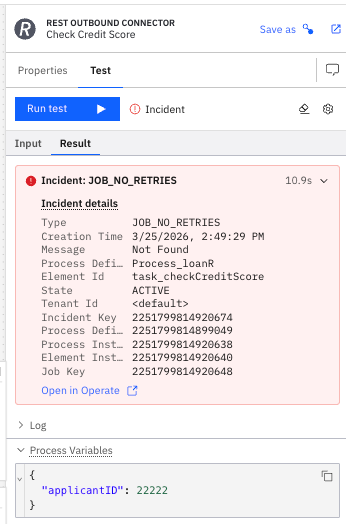
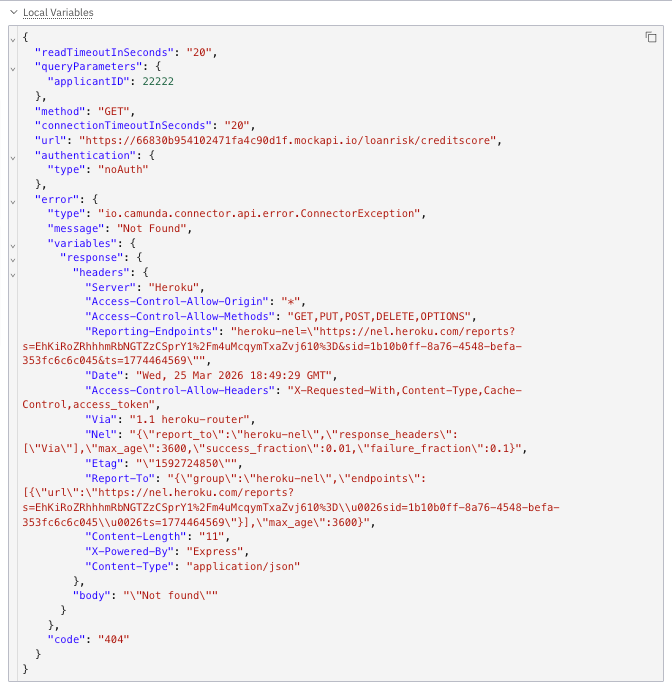
We can immediately see that the value was not found and can view the local variables for a deeper understanding of payload.
Let’s look at a couple more options for testing different task types before we discuss how the task tester fits into your organization’s complete testing strategy.
What about testing an AI agent task connector?
Wouldn’t it be helpful to test your AI agent to make sure it is working as expected with some test data? Well, Camunda’s task tester can do that as well.
For this example, we replaced the job worker Evaluate Risk in our existing BPMN process with an AI Task Agent connector that will take input data and return the risk based on the factors (obtained in the initial form for our process as well as from the REST API call).
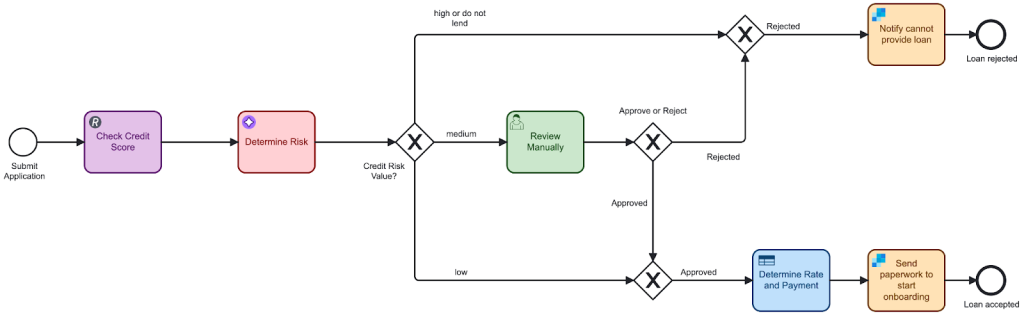
The agent determines the loan risk based on the following parameters:
- Credit Score (
creditScore) - Number of late payments (
latePayments) - Debt-to-income ratio (
dtiRatio) - Number of credit cards (
numCC) - Liquid assets (
liquidAssets) - Months at current position (
monthsJob) - Annual salary (
annualSalary) - Requested loan amount (
requestedLoan)
We have included a very simple system prompt for this AI agent:You are a Financial Risk Task Agent that needs to assess the risk for a fictitious individual. Your response should be a simple credit risk value of either low, medium, or high (in lower case) and no other information should be returned.
Our user prompt includes the specific information for the fictitious applicant:Please evaluate the risk for this fictitious individual (" + fullName + ") with the following financial profile. Credit Score of " + string(creditScore) + ", number of late payments on current debts " + string(latePayments) + ", debt-to-income ratio of " + string(dtiRatio) + ", number of existing credit cards of " + string(numCC) + ", liquid assets of " + string(liquidAssets) + ", months on current job of " + string(monthsJob) + ", an annual salary of " + string(annualSalary) + ", and a requested loan amount of " + string(requestedLoan) + "."
Here’s the details on our BPMN properties for this agent.
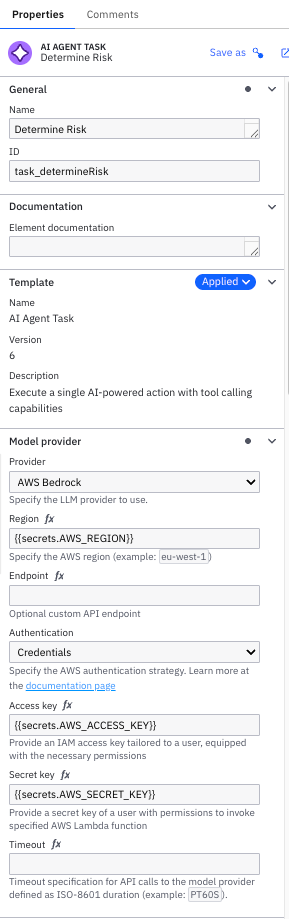

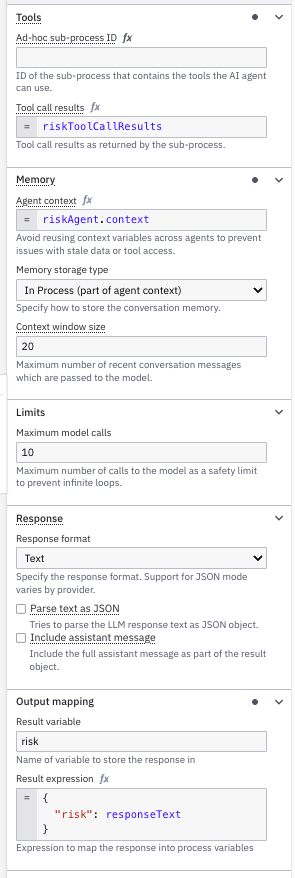
We are using the output variable, risk, to capture the requested single word response from the AI agent.
- To test this application, select your agent step and select the Task testing tab.
- Provide the proper inputs that would have been obtained in previous steps in the process.
{ "applicantID": 123456, "dtiRatio": 0.0314, "numCC": 12, "liquidAssets": 1250, "requestedLoan": 125000, "latePayments": 2, "creditScore": 720, "monthsJob": 24, "fullName": "Joyce Jones", "annualSalary": 455000 } - Once this is all entered, you will want to click on the Test tab and then on the Run test blue button.

- The results should show in the right-hand pane. Ours look something like this.

The key to this is that the agent did return a single value,lowfor the risk in this case, so it is working as designed. - We can dive into the local variables to review more information as well. This will confirm the model used (Claude), the provider (AWS Bedrock) as well as the system and user prompts.

If you would like to run the test again, click the eraser icon to clear the previous test results. In our case, we tested this again using a low credit score (530) and salary (25000) and confirmed that a high credit risk was returned.

And don’t forget, you can always click the link to View in Operate to see your task in the Operate environment.

AI Agent ad-hoc sub-process testing
With our latest release, you can now use the Task Tester to test AI Agent ad-hoc subprocess connectors in your processes. Let’s take a quick look at this in an example.
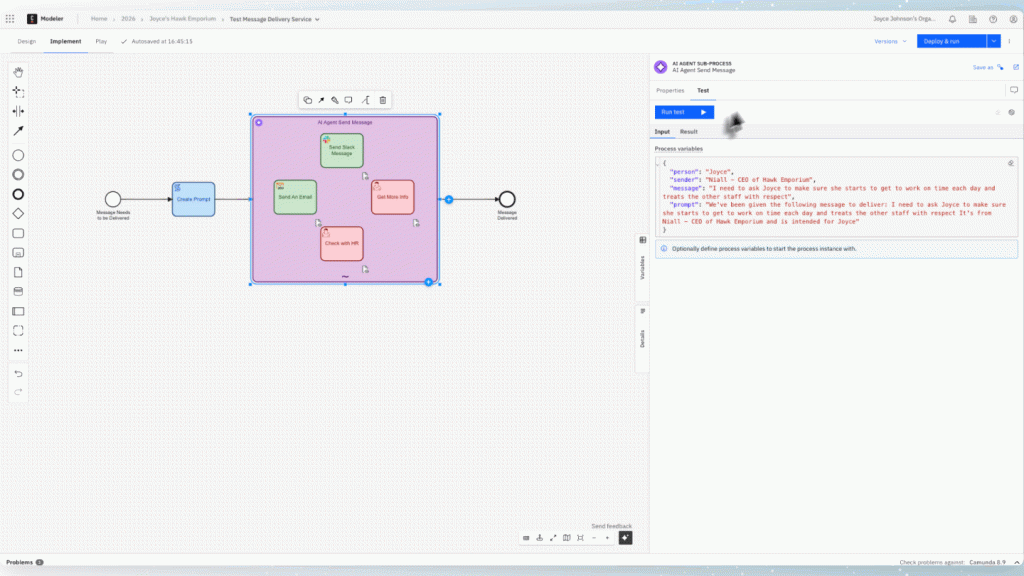
In the following process, we have a process for sending messages within a Hawk Emporium and are asking the AI agent ad-hoc sub-process to determine the best delivery method for a message based on the message context.

First, we will start with a simple message.
- We will enter the input required for the AI agent in the Test tab.

- Then run the test using the Run test button and the test will start looking similar to what is shown below.

- Once complete, you can see which element(s) were completed in the ad-hoc sub-process agent by reviewing the log.

Don’t forget, you can also see this in Operate.
Here’s a quick demonstration of running this test of an AI ad-hoc sub-process with the task tester.
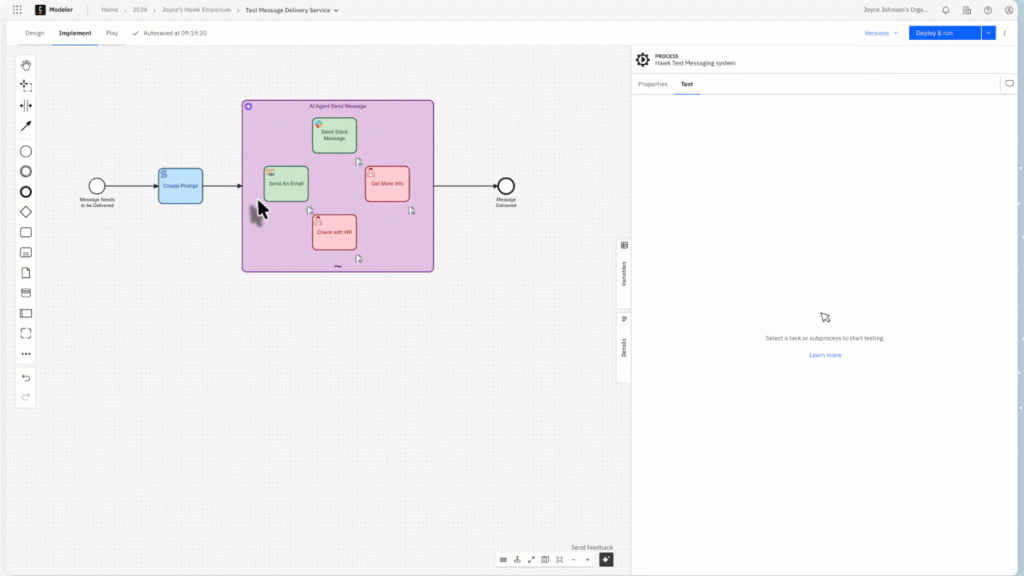
In the previous case, only one tool was utilized by the ad-hoc sub-process AI agent, but the testing can span multiple tools as well. For example, if a human task is called, you can open that task in Tasklist, complete it, and the testing will continue.
You can see an example of this behavior in the following demonstration.
Some tips for successful task testing
When using task testing, here are some tips for the best outcome:
- Start with a golden-path payload or the happy path and then add failure cases.
- Save and share payloads that mirror production scenarios for reproducibility in code reviews.
How Task Tester fits into a complete testing strategy
You have seen how task testing works with Camunda and you might be thinking about the best way to fit this into your existing test procedures and strategy. You can think about your approach as a “testing pyramid” working from the smallest component to your larger, fully-orchestrated process.
- Task testing for fast, local validation.
- Automated process tests for repeatable regression coverage.
- Integration tests for system-level confidence.
You can use task testing to reach a fully passing test suite faster.
Five practical uses cases where task tester shines
What are some of the best examples of when and where to use task testing to validate your process orchestration?
- Connector sanity checks. Validate authorization, endpoints, and responses before connecting gateways.
- Variable mapping validation. Confirm FEEL expressions for input and output mappings. Catch typos like
policydeatilsearly in your testing process. - Edge-case testing. Probe missing variables, nulls, or unexpected types and see what your task actually emits.
- Human-in-the-loop preparation. Ensure the data entering a user task or form is correct before UI work starts.
- Agentic orchestration readiness. Validate agent tasks before full process orchestration deployment.
Common pitfalls and how to avoid them
As with anything, there are some pitfalls to consider and you want to make sure that you avoid these when taking advantage of testing your process elements.
- Mistaking task-local vs. process variables. In task testing you see variables in the context of the selected task. Be explicit about what’s at the process boundary vs. scoped locally to the task.
- Overfitting to happy paths. Always run “bad inputs” and missing data. Test nulls, unexpected types, 4xx/5xx from connectors, and empty arrays to harden mappings.
- Using task testing as a substitute for observability. Keep Operate and runtime monitoring in place. Task Tester raises dev confidence. Observability governs production.
Business impact
But, does task testing really impact your business goals? Absolutely. By being able to test your individual elements, you achieve:
- Faster feedback on task logic and mappings, essentially seconds instead of full deployments.
- Higher-quality implementations with fewer “late surprises” after end-to-end runs.
- A practical step toward agentic automation by validating agent behavior inside governed processes.