
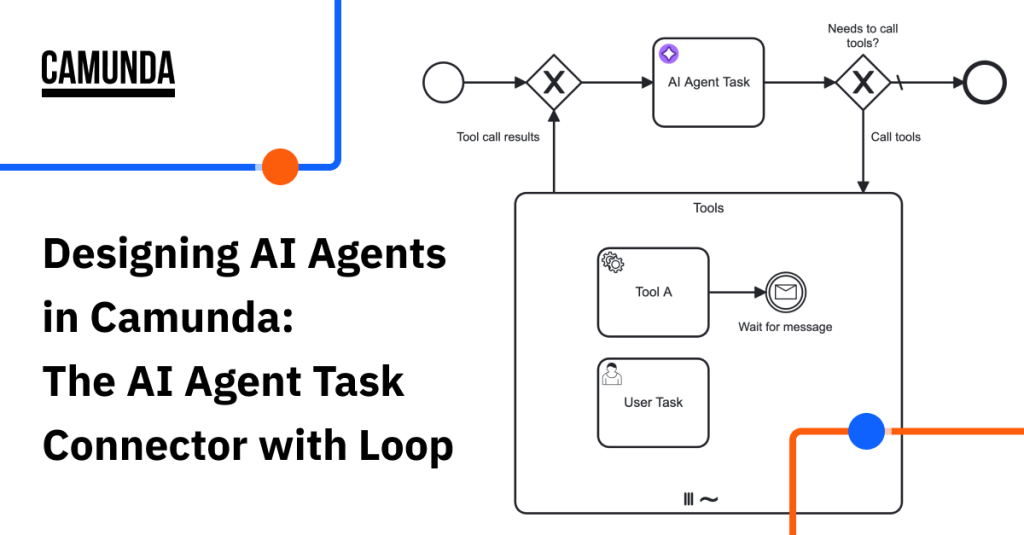


Welcome to the third blog in our series around designing AI agents in Camunda. In this blog we will be addressing using the AI Agent Task connector working with an ad-hoc sub-process with a loop for implementing agentic AI in your Camunda process.
Be sure to read the initial blogs in the series before reading this one.
- Two Connectors, Three Patterns, and One Model for Designing AI Agents in Camunda
- Designing AI Agents in Camunda: The AI Agent Task Connector Standing Alone
Pattern 2: AI Agent Task connector with loop and ad-hoc sub-process
Description: The next possible pattern is keeping the AI Agent Task connector but adding an ad-hoc sub-process as a multi-instance toolbox that contains your tools. Tools can be any BPMN element, or combination of elements, including: connectors, service tasks, RPA, human tasks, and more. The agent can request tool calling and decide if and when these tools are executed. The feedback loop allows the connector to be called repeatedly based on the tool call results until the final goal is achieved.
Strong use cases: This pattern is strong when you require more control and auditing. For example, regulated industries, explicit approvals, rate limits, and pre- and post-processing per tool call. So, choose this pattern when regulators want the decision path, or when you need explicit limits, enrichment, and human-in-the-loop on every call. With this pattern, you can add additional control over the feedback loop, you can model pre-/post-processing of tool calls with additional tasks, such as approval or tool call auditing.
Poor use cases: This pattern would be unnecessary for simple use cases where you have a deterministic set of tools that always must be called or a single AI Agent Task connector could be used.
Strengths: The strength of this pattern is control. Every tool in your ad-hoc sub-process toolbox becomes a visible BPMN step for auditing and tracking. This means you know what tools your AI agent deemed were required to complete the task at hand and the history of what data was used to make this determination. With this pattern, you can easily inject validation or human-in-the-loop to your toolbox or even before and after tools.
This pattern also provides you with a lightweight, flexible, iterative approach to your AI agent interactions supporting a feedback loop where the AI agent can make multiple tool calls as needed. This is a great option where interactive reasoning or refinement may be required. The connector will continue to make any required tool calls until it reaches its goal or a configured limit.
Weaknesses: This approach does come with some trade-offs, however. There is some additional modeling overhead and more nodes per instance created. Your BPMN can look a bit more complex from a reliability standpoint as well. This approach can be slower than a single step especially if multiple iterations are required to complete the goal. And if you require event sub-process handling inside of the tool loop, you must handle timeouts and loop cancellations outside of the loop.
AI Agent Task connector with loop and ad-hoc sub-process example usage
The following example shows the use of an AI Agent Task connector outside of an multi-instance ad-hoc sub-process. The way this pattern works is as follows:
- A request is made to the AI Agent Task connector, and the LLM determines what action to take.
- If the AI Agent Task connector decides that further action is needed, the process enters the ad-hoc sub-process and calls any tools deemed necessary to satisfactorily resolve the request.
- The process loops back and re-enters the AI Agent Task connector, where the LLM decides (with contextual memory) if more action is needed before the process can continue. The process loops repeatedly in this manner until the AI agent decides it is complete, and passes the AI agent response to the next step in the process.
The process snippet below shows an AI Agent Task connector with an ad-hoc sub-process loop for upselling insurance to a customer.

The key to this example is how the agent is associated with the ad-hoc sub-process and how the tools are exposed to the AI Agent Task connector. You model this AI Agent with the AI Agent Task connector outside of the loop and then you need to give that task connector access to the tools it will need to accomplish its goal. Let’s show how that is accomplished.
How to give your AI Agent Task connector access to tools
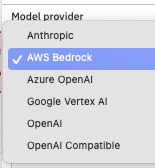
First, you will need to select your model provider for this agent. You have a wide range of options in the AI Agent Task connector.
You will then need to choose the model and set the other parameters just as you did with the first pattern of a standalone AI Agent Task connector.
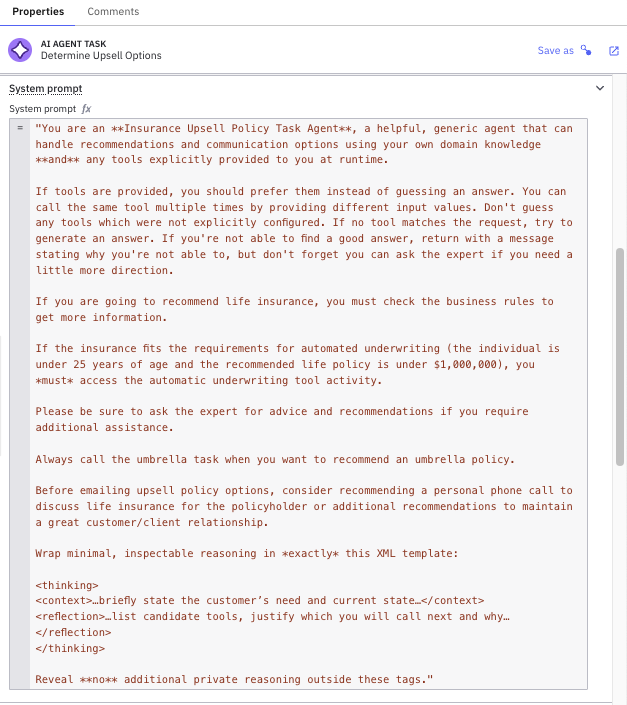
Next, we must provide the proper system and user prompts to the AI Task Agent connector. In this example, the system prompt is quite verbose to make sure the proper tools are called based on the portfolio of this insurance company. The system prompt clearly indicates the job for the agent as shown below.
The user prompt provides the individual process instance details to the agent so that the agent knows the specifics for this customer and the proper recommendations can be made.

The additional details within the user prompt add clarity to the system prompt by providing a summary of recent changes made to the policy holder’s policy, changeSummary. It also includes data from the single AI Agent Task connector (from the first pattern) which contains recommendations for upselling policies using the variable recsForUpsell.
And now we need to tell the AI Agent Task connector which ad-hoc sub-process should be used to find the tools that can be called to achieve its goal. The ID for the ad-hoc sub-process is defined, up_sellTools as well as the result from each tool call in toolResults as shown below.

You finalize the AI Agent Task connector with a loop by defining the memory context and setting a maximum limit for the number of calls to the AI Agent Task connector as shown below.


Finally, it is important that the agent knows when to use each tool and what it does. That is done in this pattern by adding documentation to the individual tool. An example can be seen in the DMN task shown below.

The key to providing information to the agent about the use of each tool is to add element documentation to the tool. In this case, the DMN task has this documentation.
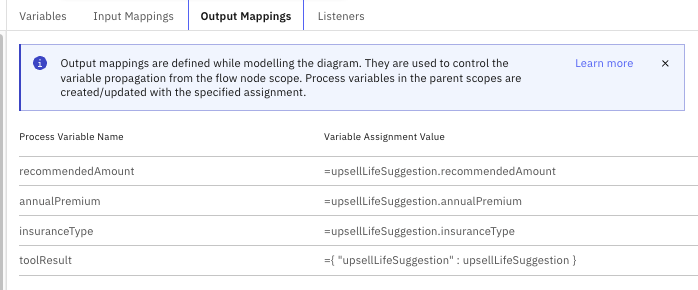
Use this activity to get a better idea of criteria around selling life insurance to new drivers to obtain the coverage type, the overall coverage and annual premium. You need to always do this when you are recommending life insurance.This provides the clarification to the agent about when you would want to check these business rules. This also shows the response added back to the toolResult variable which is the upsellLifeSuggestion.
Another example in the set of ad-hoc sub-process tools is a human task. In this case, the tool is a set of BPMN elements.
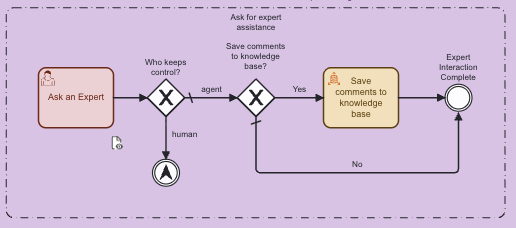
Only the first element in this sequence needs to be configured to explain to the agent the usage of the tool. This can be seen below.

The following documentation is provided for the agent:
Use this activity when you need the help and assistance from an Expert to reach out to the customer and talk to them on what type of insurance policy should be recommended.The recommendations obtained are then passed back in the toolResult showing the actions taken by the agent.
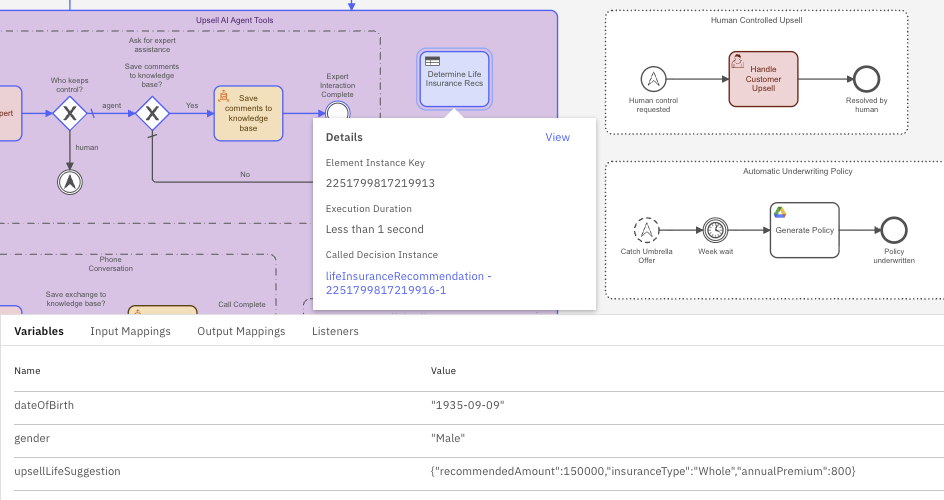
When executed, this pattern provides details on each time a tool is called in Operate as well as the input and output variables used for that tool call.
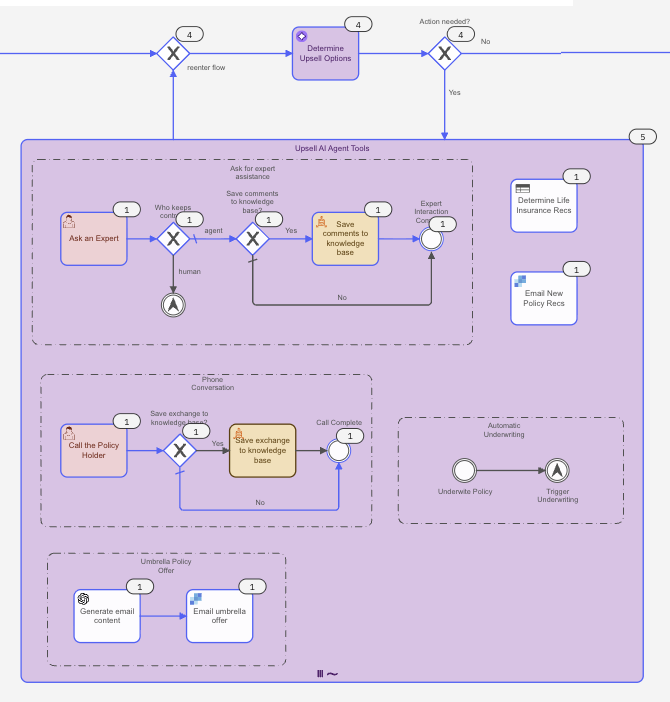
Here we see that the AI Agent Task connector was called multiple times to complete its task. Camunda also keeps track of the variables for each tool for the DMN element. Below we see the variables passed to the DMN table (date of birth and gender) and this is used to determine an appropriate life insurance policy with the proper coverage and annual premium.
We can also see what is passed back to the agent, upsellLifeSuggestion, which is the output from the DMN table.
As you can see, you have a low level of granularity of the individual tools with this pattern.
Understanding when to use the AI Agent Task connector with loop and ad-hoc sub-process
To take advantage of this pattern, you need to have an AI Agent Task connector with gateways and a multi-instance ad-hoc sub-process that holds your tools so that your agent can decide if, when, and how calls should execute. It provides very granular tracking of tools used and how they were used to achieve the required goal.
Next up
Our next blog in the series will take on the next pattern, the AI Agent Sub-process connector. Be sure to check it out.
Start the discussion at forum.camunda.io