

Business processes evolve, requirements change, systems improve, and intelligent automation becomes more sophisticated. However, even as we design better, more efficient processes, there may be thousands of process instances already running in production.
In some cases, we need to have these instances finish out their original process path, but often, you need to take advantage of upgraded or enhanced logic without losing business progress, data, or affecting customer satisfaction.
This is where process instance migration comes in. It’s a powerful, often underappreciated capability that enables organizations to adapt quickly and safely without stopping critical operations. For enterprises investing in AI agents and goal-directed automation, this becomes even more essential.
Let’s explore what process instance migration is, why it matters, and how Camunda supports it as part of your broader automation and orchestration strategy.
What is process instance migration?
Process instance migration is the controlled movement of in-flight process instances from one version of a process model to a newer version. This allows businesses to improve or change their process definitions while preserving the state, progress, and data of running instances.
Typical migration scenarios include fixing logic errors, introducing new compliance rules, or enhancing process efficiency. With AI agents in play, it also means incorporating smarter decision-making tools mid-process.
Common migration scenarios include correcting logic errors, adding new compliance rules, and improving process efficiency. With AI agents in the loop, you can also introduce smarter decision-making mid-process. This becomes critical as you fine-tune agents by adding human guardrails, integrating new tools, or upgrading existing ones to optimize agent performance.
You can think of process instance migration as upgrading the navigation software of a plane while it’s flying, but with complete reliability and traceability.
Why migration is a strategic capability
Process instance migration isn’t just a technical necessity, it is a requirement. It allows business to unlock tangible value and align closely with strategic priorities across IT, operations, and the customer experience.
- Maintain business continuity. With migration, there’s no need to cancel or restart thousands of in-progress workflows. Work continues, uninterrupted, even as process logic evolves. You keep the data, history, and audit data across process versions.
- Accelerate change cycles. You can deploy process improvements faster knowing you can migrate live instances safely and systematically. This reduces the lead time between identifying a need and delivering value.
- Enforce compliance updates. When regulations change, process instance migration ensures that all relevant processes, including those already in flight, reflect new rules immediately, where appropriate.
- Increase agility with less technical debt. Instead of maintaining old process versions indefinitely, teams can retire outdated models and simplify governance.
These advantages compound in enterprise environments where agility and risk mitigation go hand in hand. Camunda customers, such as insurance providers, banks, and telcos, use process migration to deliver faster, smarter, and more compliant services—all without operational disruption.
How Camunda supports process instance migration
Camunda provides out-of-the-box support for process instance migration through versioned process definitions and tooling designed for reliability and control. Every time a process model is deployed, Camunda assigns it a version. Running process instances remain tied to their original version unless they are explicitly migrated.

Using Camunda’s migration capabilities, you can:
- Create migration plans that map tasks from the old model to the new one
- Define rules for handling added or removed tasks
- Automatically or manually migrate batches of running instances
- Monitor the progress and outcome of migrations with full traceability
Migration can be fully automated or involve human oversight, depending on the criticality of the process and business requirements. Camunda also provides guidance on backwards-compatible modeling, which makes future migrations easier to execute.
How to migrate a process instance using Camunda Operate
Now that you have a good understanding of the importance of process instance migration, let’s walk through a simple exercise to show you how this would work.
Camunda 8 supports instance migration through Operate and through the Zeebe API. Operate is the most common approach because it gives you controlled visibility into state, tokens, and incidents. For our example, we will be using Operate for the instance migration.
Migration example scenario
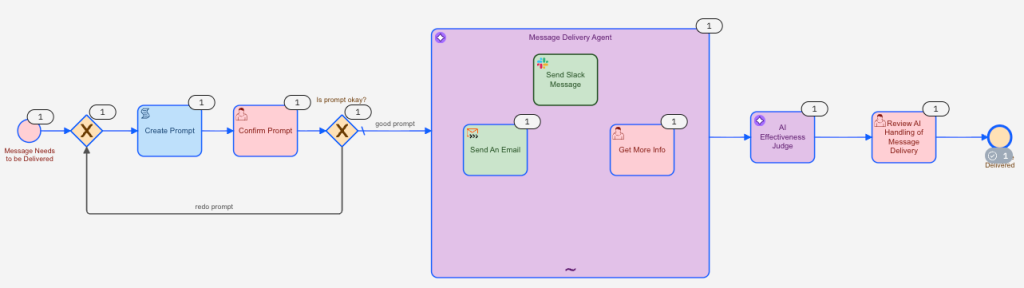
For this example, we have created the following scenario. At Horses & Hawks Habitat, we take in both hawks and horses from poor situations for rehabilitation and rehoming. We have a large volunteer and paid staff and often need to send messages out using the proper messaging channel quickly and efficiently to our teams. To expedite this process, we have created the following simple workflow:
- An employee enters a message to be sent including the message target (recipient) and the message originator (sender).
- A human checks the message to approve it or make suggestions before sending it through to the AI agent.
- The message delivery AI agent gathers required additional information. The proper messaging channel, either Slack or email, is selected for the message, and the message is delivered.
- A quick review of the AI agent’s performance is provided for continuous improvement of the process.
Here’s the initial process for this scenario:

A typical process instance execution
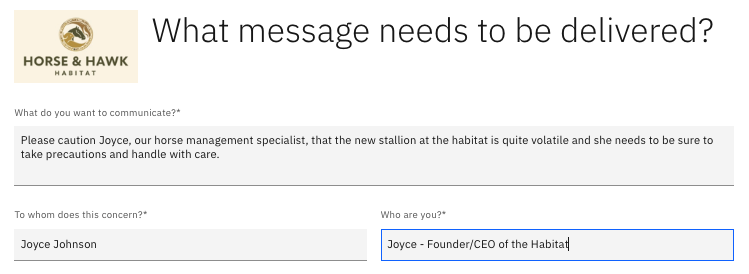
First, the message to be sent to the staff or individual is entered in the provided form giving details on the recipient and the sender making the request.
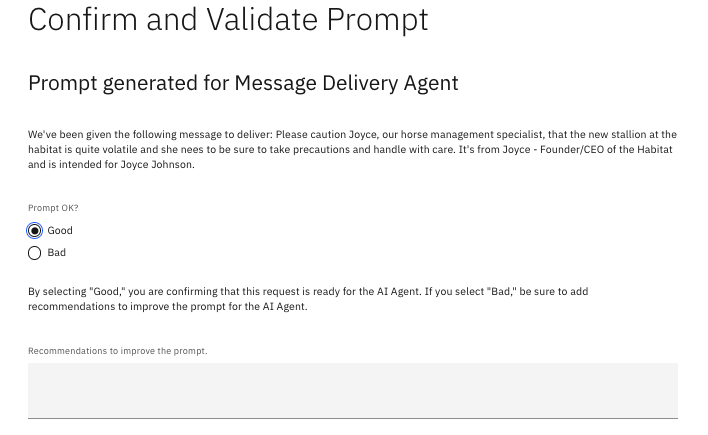
Since we are a bit new to adding AI into our processes at Horse & Hawk Habitat, we wanted to add a check to see how the prompt looked. We also wanted an opportunity to see if we could improve the message before asking the AI agent to determine the best delivery platform for the message and to send it. This just gives our team a chance to check things out. We plan to eliminate this step soon.
Now we wait for the AI agent to determine who receives the message, if a specific individual is not flagged, and which is the best channel to send it on. First, the AI agent has a couple of questions for us: Is this Joyce the same one as the current CEO? And what is this Joyce’s contact information?
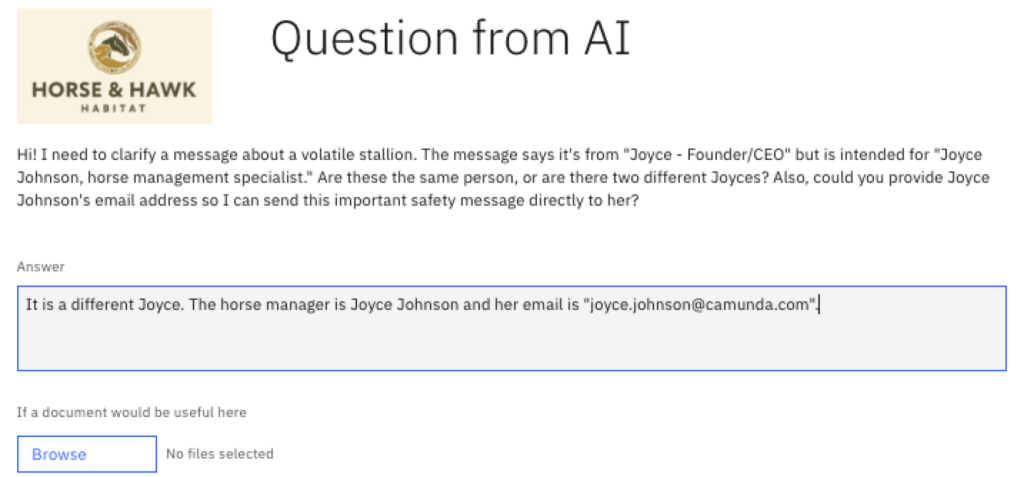
Since this message seems to be of a personal nature, it makes sense that the AI agent would send an email, and that is exactly what took place. The original message has been enhanced by the agent for a more meaningful and complete message.

We can assess the agent’s performance and examine its rationale for that assessment. These insights are essential for future improvements.

As you can see below, the agent executed two of the three available tools in our message delivery agent in order to achieve its goal: it requested and received more information and sent an email.
Why a new model?
Let’s assume that Horse and Hawk Habitat has been running this model for quite some time, and we’ve found that we can make some improvements. For example, in certain situations, the message being sent needs a review by human resources for further refinement.
Adding a tool for human resources communication
Here’s an example demonstrating why another human guardrail to our AI agent can improve the overall performance of the message service.

As you can see, this is a personal message that should likely have some oversight from our human resources department. In fact, that is exactly what our agent suggested.

However, our current process does not have a mechanism for HR approval and review. The agent clearly sees the need and wants to have the communication to HR, but the suggestion to send an email doesn’t have a mechanism to take that input and feed it back to the process.

This exchange goes back and forth between the human and AI until AI sends an email to HR.
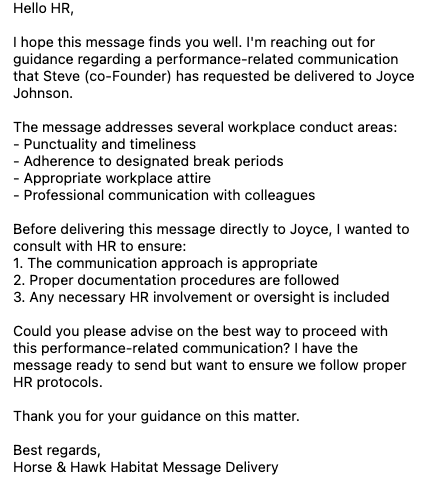
The issue is that we do not have the proper feedback mechanism in our existing process for any response from HR to be incorporated, so the target of the disciplinary conversation is never notified.
We worked with our team and determined that the best (and simplest) approach would be to add a human step as an additional guardrail in our AI agent. This would allow a review by HR, when the message indicates that this would be applicable. You can see this in the new version of the BPMN model below.

Now that you have the full background for the Horse and Hawk Habitat scenario, let’s move forward with migrating a live process instance.
Note: The steps below assume you are migrating an instance from process definition version n to process definition version n+1 of the same process definition key. You also need to deploy version n of the process before starting the step-by-step instructions below. Feel free to skip the next section if you don’t want to walk through a step-by-step migration.
Steps to migrate a process instance
Now let’s cover the steps for migrating a process instance using Camunda Operate. Follow along as we demonstrate using our example scenario.
Set up at least one process instance to migrate
For our example, we’ve made sure that there are a couple process instances in the original version (without the HR user step) so that we’ll have an active process instance to migrate.
Deploy the new process definition
Take the following steps to deploy a new process definition:
- Update your process model and create a new version. In our example, we created a human resource user task within our message delivery agent.
- Deploy the new version to your cluster.
- Verify that you have the previous version and the new version available in Operate with the same process definition key.
Below, you can see that in our example, there are multiple deployed versions.
Our original (version 19 with version tag of v1) has two processes in flight.
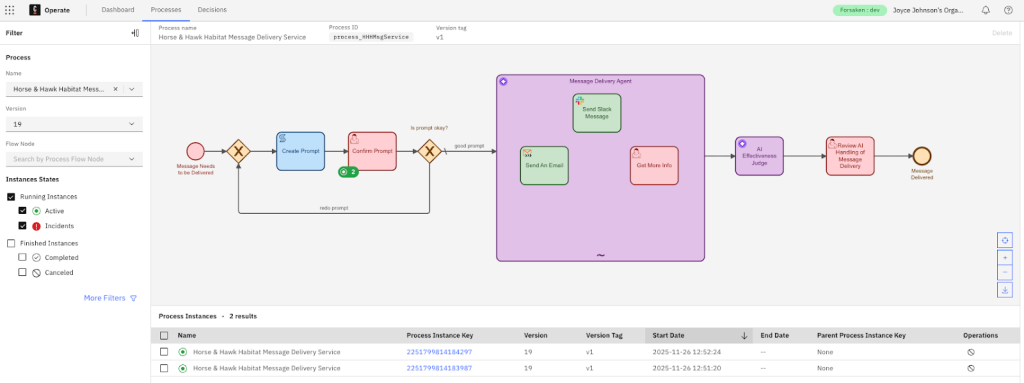
We also have a new version deployed (version 20 with a version tag of v2) with one active process.
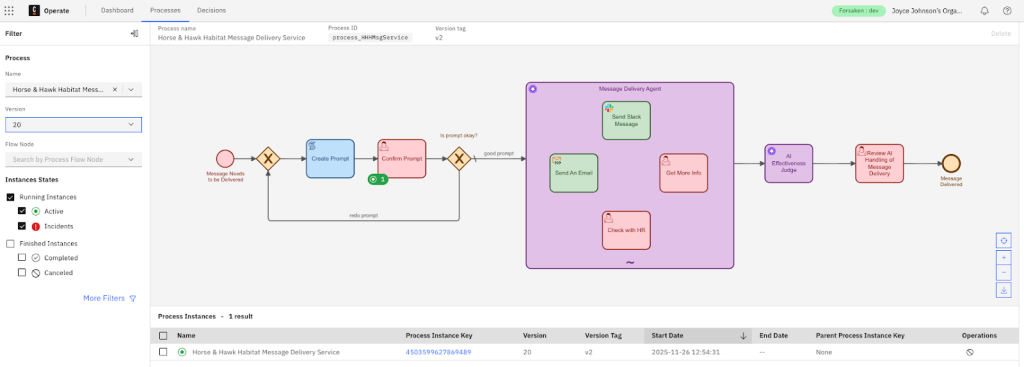
By deploying the updated version, you ensure the target process version is available before migration.
Identify the instances you want to migrate
Now you need to determine which process instances from the previous version should be migrated.
- Open Operate.
- Navigate to Processes to find the in-flight process (or processes) that you wish to migrate.
- Select the process definition (in our example, Horse & Hawk Habitat Message Delivery Service has current running instances. You can filter by the previous version (version 19, version tag v1)).
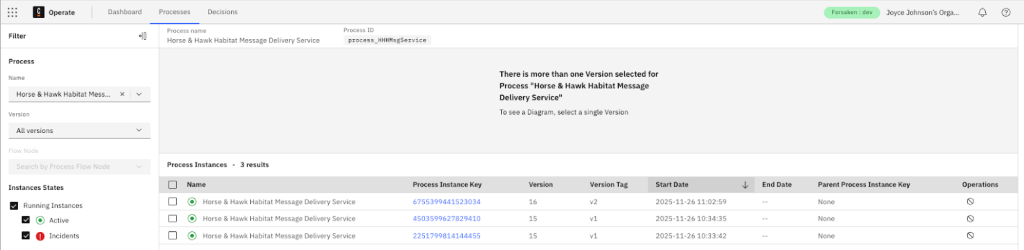
Make sure that you have the correct instances in view that you want to migrate.
Start a migration in Operate
We are ready to start the migration. If you have more than one active process instance and you want to migrate both at the same time, you can select both. In our example, we’ll only be migrating one instance.
Select your process and version from the sidebar.
Select the individual process instance you want to migrate and click Migrate.

A dialog prompts you to explain the process. You can elect to not show this message again by checking the appropriate box and then click Continue.

If it’s not already selected, select the target process definition (in our case, version 20 with version tag of v1).
If there is more than one option, Operate will show all available versions of the same process definition key.
Operate will attempt to auto-map activities by matching activity IDs. Those shown with green check marks are valid 1:1 matches.

If any manual mapping is required, you can change the mapping by selecting the appropriate target activity so that each active token has a valid landing point.
Configure the activity mappings
Now you need to choose the appropriate target activity for each source activity. Here are some guidelines:
- If activity IDs match, keep the default mapping.
- If tasks were renamed or refactored, manually select the correct target activity.
- If the target model has a step removed, choose the next step that preserves business semantics.
- If variables changed, confirm that the instance will still have the variables required for the new step.
For example, we mapped the Confirm Prompt step below as it was not initially mapped.

Click Next to complete the mapping step.
Migrate the select instance
Now that all the individual elements are mapped appropriately, you can migrate the selected instance or instances.
A prompt asks you to confirm that you understand that a process is being migrated from version 19 to version 20.

At the bottom of the screen, confirm the migration by typing MIGRATE into the dialog box as shown below.

Click Confirm.
Monitor the migration
You will be able to see the migration’s progress under Operations in the Operate console.
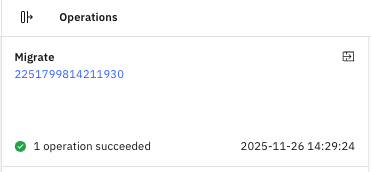
That instance will show an Operation State of COMPLETED. When you open the instance, it will note the day and time of migration.

Verify the migration
After you have migrated, open the instance in Operate to review the status. You will see the following:
- The process definition version is now the target version.
- The current activity is the expected mapped activity.
- Variables remain intact and valid.
- The option to move the instance forward manually (eg, complete a user task or send a message) to ensure it runs cleanly.
In our example, we had an in flight process that required HR input. We can see that the workflow picked up the new tool from the agent to successfully resolve this message delivery.
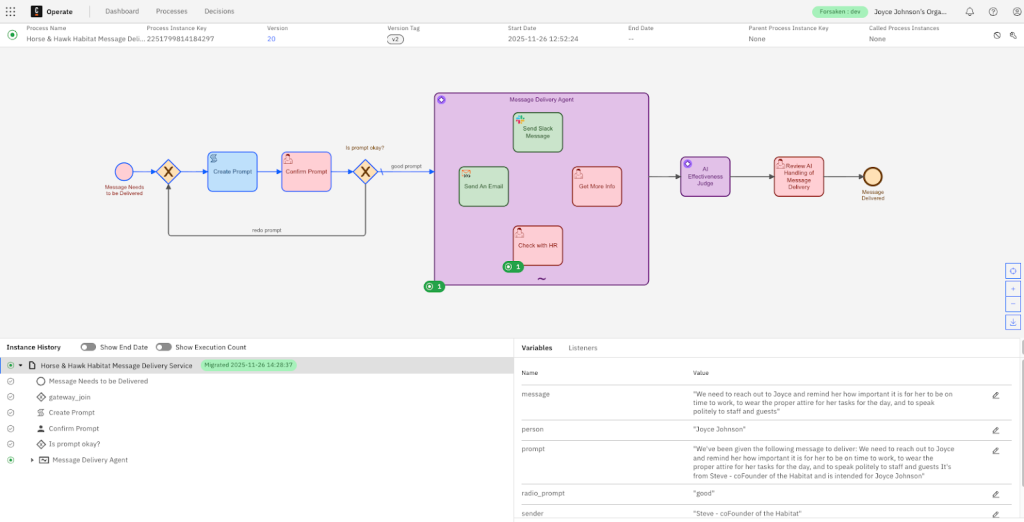
HR can now review and approve the message before it goes out to Joyce.
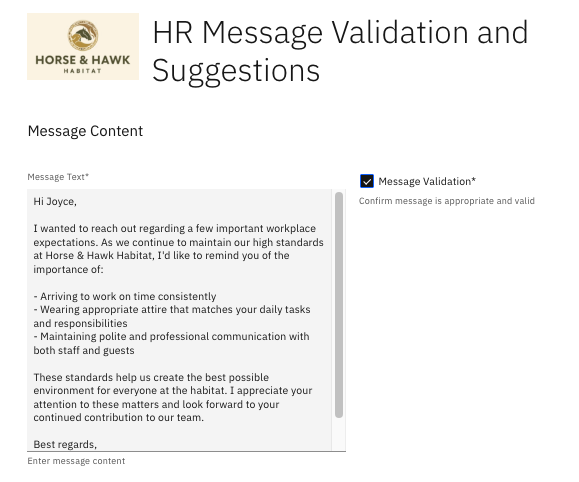
By making this process instance migration, we’ve been able to improve our AI agent and process to take advantage of new tools and features not previously defined in older versions of the process.
Monitor and handle incidents
Although not required in our example, you may need to monitor incidents if the new version expects variables or states that the migrated instance does not have.
- Open Incidents in Operate.
- Inspect stack trace and variables.
- Add missing variables or correct business data.
- Retry the activity.
Best practices for successful migration
There are some best practices that you can follow to set the foundation for successful instance migration in the future. Successful process migration is as much about design as it is about execution.
Here are a few things to remember:
- Design for flexibility. Model your processes with maintainability in mind. This means taking advantage of elements like subprocesses and consistent task IDs to simplify the mapping from version to version.
- Testing matters. It is always important to validate your migration plan in a staging environment to verify your mappings and the expected results before applying them in production.
- Carefully handle the state of variables. Process variables serve as the short-term memory of each process. It is vital that any newly introduced tasks have all the context they require, especially if their behavior depends on variable values from earlier steps.
- Measure the impact. Measure the impact of migrations using Camunda Optimize. This is key to understanding if new versions perform better and help you to identify any issues early.
Migrating process with AI agents for smarter automation
As enterprises adopt agentic orchestration, process instance migration takes on a new relevance and importance within the organization. In your agentic models, the AI agents are responsible for making decisions by selecting tools and navigating complex, goal-oriented workflows. These agents often evolve rapidly, requiring new capabilities to be introduced as soon as they are available.
Let’s take a look back at our example process with Horse and Hawk Habitat. We have to send a message that requires the approval and validation of our human resources department, but that was not originally part of our agent toolbox. We needed to add this functionality to keep our agentic process running efficiently.
Now imagine that you have a customer service process where an AI agent classifies support tickets and drafts responses to customer inquiries. Next, imagine a new, more powerful language model becoming available that improves classification accuracy by 30%.
Without process migration, existing support tickets continue to use the old model, missing out on the upgrade and costing the company money due to inaccuracies. With migration, those live instances can immediately benefit from the new intelligence.
Camunda enables this kind of adaptive intelligence by providing:
- Ad-hoc subprocesses that allows agents to dynamically select tasks at runtime
- Connectors that plug in large language models (LLMs), decision services, or custom planning logic
- Short-term memory (via process variables) to preserve context across versions
- Long-term memory integration through external knowledge sources
- Zeebe’s durable engine, which ensures state persistence and recovery
By migrating to new versions with expanded toolsets, organizations can improve outcomes and accelerate learning loops optimizing decision quality while boosting ROI on AI investments. Taking advantage of this feature from Camunda, process orchestration becomes your foundation for scalable, intelligent automation.
As organizations begin to rely on AI-powered agents to drive dynamic, goal-directed processes, the ability to upgrade those agents that are mid-process becomes a business-critical advantage.
Why does this matter?
AI agents are only as capable as the tools and context that they have available. As your enterprise integrates new LLM capabilities, offers new tools and improvements for existing tools for the agent, enhances fraud detection models, or updates retrieval-augmented generation (RAG) components, you need to incorporate these improvements into your running agentic processes without restarting or rearchitecting them from scratch.
Business benefits
Take advantage of process instance migration when you implement agentic processes. You can give your organization a significant business advantage with benefits like:
- Continuous innovation without disruption. By migrating in-flight process instances to leverage new AI tools, such as enhanced summarization, classification, or reasoning models, while preserving progress and context, you can benefit from a continuously improving model without taking your processes out of production to make updates.
- Adaptive customer journeys. Let’s assume you have a case agent managing a multi-week claims process. By taking advantage of process instance migration, you can seamlessly switch to using a more advanced LLM for document review and sentiment detection, for example. This enables a better customer experience without waiting for the next case cycle to begin.
- Higher ROI on your AI investments. Every new tool or capability that you add to your stack can deliver immediate value. That isn’t just for new cases, but for existing ones as well. Process instance migration ensures that you’re maximizing the impact of AI across your organization and your process landscape.
- Faster learning loops with insight. By combining process instance migration with telemetry and Optimize to compare outcomes between pre- and post-migration cohorts, you enable rapid iteration and fine-tuning of agent behavior.
Camunda’s process instance migration allows your agentic orchestration to meet operational excellence, empowering AI agents to continuously evolve without pausing business.
Final thoughts
Process instance migration gives organizations the power to evolve without disruption. Whether you’re adjusting logic in a loan origination workflow, introducing new compliance steps, or upgrading the toolset of an AI agent mid-process, Camunda provides the robustness and flexibility you need to do it right.
As processes become more dynamic, intelligent, and distributed, the ability to migrate confidently is no longer optional; it’s a requirement for continuous improvement.
To get started, explore Camunda’s documentation or try out a sample migration in your staging environment. For more advanced use cases involving AI agents and event-driven orchestration, reach out to our team or explore our resources on agentic orchestration.
Recommended resources
Want to read some more about this? Check out the following additional resources.