


Rapidly shifting market demands, mounting technical debt, and the race to embed AI at scale have pushed traditional automation tools to their limits. Camunda 7 has served as a critical backbone for orchestration for many organizations, but tomorrow’s rising challenges—real-time orchestration, hybrid workflows, AI-infused business logic, and agentic orchestration–require a platform purpose-built for the new frontier of fast-changing technologies and intense competition.
Camunda 8 answers that need. It serves as the essential orchestration layer across all your tools, systems, and teams. With a cloud-native, composable architecture, it delivers elastic scalability, reusable, flexible integrations through the Connector ecosystem, native AI integrations, and powerful agentic orchestration. These capabilities enable organizations to scale efficiency, reduce complexity, and align business and IT around intelligent processes that adapt in real time through AI-driven decisions and exception handling.
In the sections that follow, we’ll take a closer look at how Camunda 8 delivers on those promises in a way that Camunda 7 cannot.
To help you get the most out of this post, we’ve included links to key topics in this blog so you can quickly skip to the sections that matter most to you:
- Accelerated innovation
- Increased architecture and integration flexibility for your organization
- Greater operational efficiency and reduced total cost of ownership
- Seamless scaling with enterprise-grade reliability
- Enhanced team productivity and collaboration
- Achieve process orchestration maturity with Camunda 8
- Ready to migrate? Here’s where to start!
Accelerated innovation
The next evolution of automation has arrived: agentic orchestration.
Companies need to leverage the power of AI. They specifically need a way to operationalize AI in their core processes—and move beyond simple, individual productivity use cases. This requires not just the orchestration of AI but enabling AI to influence and adapt workflows dynamically.
This cannot happen in isolation. But it does need to integrate existing infrastructure and investments while providing value right away.
Camunda 8 delivers exactly that and more. Our powerful process execution engine has been infused with the unique ability to seamlessly blend deterministic and dynamic orchestration in a unified agentic orchestration model—with guardrails, auditability, and control.
Modernize with new native AI and agentic capabilities
Camunda 8.7 introduced agentic orchestration to enable teams to operationalize AI and model, deploy, and manage AI agents seamlessly into their end-to-end processes.
Our unique approach combines deterministic (orchestration logic that’s defined at design time) and dynamic (orchestration logic is determined at runtime, leveraging AI models and runtime data) process execution. This combination ensures compliance and provides organizations with control and transparency while leveraging AI-driven decision-making to enhance automation and optimize and scale business processes efficiently.
We’ve also added support for BPMN ad-hoc subprocesses. You’ve now got the flexibility to trigger optional tasks dynamically during execution— ideal for exception handling and human-in-the-loop workflows without redesigning core processes.
New, composable task automation including IDP and RPA
Additionally, we introduced new native task automation capabilities including Intelligent Document Processing to help companies transform documents into actionable data with AI-powered document processing. This gives you the flexibility to choose your LLM and customize and extend the solution to fit your needs.
We also introduced Robotic Process Automation so teams can seamlessly integrate and bridge legacy systems without APIs. RPA also gives you the power to create and orchestrate new bots, elevating isolated task automation into scalable, end-to-end process orchestration to fully operationalize AI across all people, systems, and devices.
And we’re continuously working on more out-of-the-box task automation capabilities like, for example, the SAP integration.
Increased architecture and integration flexibility for your organization
Job workers
Camunda 8 fully embraced external job workers, which dramatically enhances architectural and integration flexibility.
Unlike traditional embedded execution models, job workers allow business logic to be executed in distributed, decoupled services. This design pattern makes it easy to scale individual services independently, integrate with existing systems without tight coupling, and maintain clear boundaries between orchestration engine and implementation.
As a result, teams can adopt a more modular, service-oriented architecture that aligns with modern cloud-native practices.
Polyglot architecture
Camunda 8 provides multiple officially supported clients and SDKs, most prominently covering Java, Spring Boot, and Node.js, in addition to clients and SDKs maintained by the Camunda community.
Especially because of our job worker architecture, you can mix and match any programming language with Camunda 8 due to its inherently polyglot architecture (i.e., multi-language architecture). Essentially, it’s a microservice architecture in which developers can use multiple programming languages and technologies simultaneously. Use the most efficient technology to automate the different tasks in your processes.
Orchestrate microservices
Is your organization building your own microservices or working with Kubernetes?
Camunda 8 takes advantage of the latest technologies, including Kubernetes, containerization, and microservices. Using Camunda 8, you can orchestrate the microservices necessary to achieve your end-to-end automated business process.
If you’re looking to build out your own microservices or already have existing services, you can start your microservice orchestration journey with Camunda 8.
Enable low code
Camunda 8 incorporates low-code features in a way that enables a wide array of personas to take part in solution building—from developers to business users—without sacrificing power or flexibility.
With features like out-of-the-box Connectors, Forms, and the AI-powered Camunda Copilot, teams can model, deploy, and iterate on complex processes faster. Our approach blends developer-friendly design with reusable building blocks that accelerate delivery, all while preserving the ability to go deep with code when needed.
It’s low-code done the Camunda way: extensible, open, and purpose-built for real-world automation.
Multiple deployment options, including multi-tenancy
The Camunda 8 platform can be installed in a highly available, resilient setup on Kubernetes, possibly running thousands of process instances per second.
But despite all of the power, you can still run Camunda 8 as a single JAR or Docker container (new in Camunda 8.8). This allows for quick setup and configuration and streamlined resource management—ideal for local developer environments, as well as production environments with more simple use cases.
Additionally, Camunda provides multi-tenancy (currently only available with Camunda 8 Self-Managed), which allows sharing one installation among a set of teams or projects, as customers can create and provide tenants by use case or teams or both. These tenants share a single Camunda cluster, so this is a great way to scale automation to multiple teams while minimizing operational costs.
Ultimately, these options also give your center of excellence (CoE) many possibilities to operate Camunda efficiently for multiple solution teams to advance their automation initiatives. This frees up solution teams from needing to install and configure Camunda themselves, allowing them to simply leverage a Camunda engine that’s been provisioned for them, reducing cognitive load and accelerating development speed for their team.
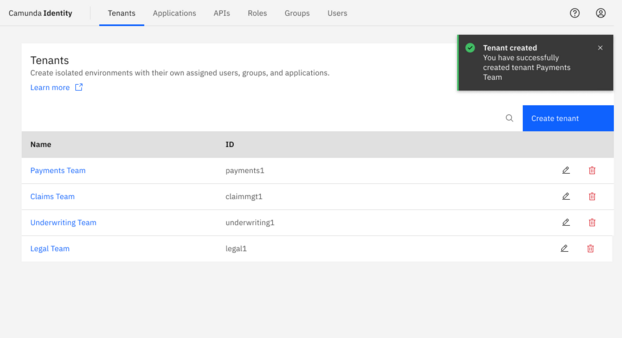
Multi-tenancy with Camunda 8 simplifies the management of access control and credentials, across teams and processes, API keys, configurations, team onboarding and more. Once processes are deployed, you can point Operate to specific tenants (where the processes are deployed) providing a way to search, monitor, and resolve instances.

Greater operational efficiency and reduced total cost of ownership
Your company may have already embraced cloud technologies, which is guiding you to a cloud native infrastructure.
The default environment for Camunda 8 is our SaaS edition where Camunda hosts the Camunda 8 platform in a Kubernetes environment. Applications that use the workflow engine take advantage of the SDK for the programming language of choice.
If your organization is considering or is already taking advantage of various SaaS services, then it might be a good time to consider migrating your Camunda 7 environment to Camunda 8 on SaaS, where Camunda hosts and takes care of the technical setup. SaaS provides collaborative modeling features for unlimited BPMN/DMN models.
Remember, you don’t have to move everything to the cloud with SaaS. For example, you can run your Connectors in hybrid mode which allows you to run a Self-Managed Connectors runtime instance attached to your Camunda SaaS cluster. This can be very important when you have services that must be isolated within a private network, for example.
It’s worth noting that you don’t have to go to SaaS to reap the benefits of Camunda 8. You have the option to operate Camunda 8 Self-Managed, offering enticing features that could encourage your organization to consider migration as well.
Check out the architecture options and recommendations if you decide to go Self-Managed.
Free up resources with SaaS
Moving to Camunda 8 SaaS can prove to be very cost-effective, allowing organizations to save on hardware, installation, and maintenance of infrastructure. As one of our clients who completed their migration told us:
“Our time [was] better spent developing new features and not monitoring our infrastructure.”
This organization went from spending about two days a month managing the infrastructure for Camunda 7 to virtually none with Camunda 8 SaaS, which frees up over five weeks of human resources for other projects and development.
Without the need for hardware and software infrastructure, your organization does not need to employ or contract personnel with the skills to support this environment. If existing resources have been supporting the infrastructure, they can be redeployed to work on different projects within the organization.
Local or cloud-based modeling, you choose
Using the Camunda 7 Desktop Modeler in your development approach can pose challenges when involving business users or in low-code scenarios where you want a browser-based tool chain. Web Modeler with Camunda 8 offers powerful collaborative abilities like commenting, paired process design, and milestone creation. It also delivers the flexibility to collaborate with the roles you want to, to deploy to the environment you choose, or to sync with the version control systems you have running.
If you prefer a local development experience that plugs into your professional software development environment, you can download Desktop Modeler and implement Camunda with Modeler and your favorite IDE. Process building is streamlined with all required components hosted in the cloud or Self-Managed.
Holistic process intelligence and analytics with out-of-the-box Optimize
With Camunda 7, you have the option to use Optimize but with an additional required installation. With Camunda 8, Optimize is integrated by default since other Camunda applications also take advantage of Elasticsearch.
So with Camunda 8, there’s no longer an additional hurdle to using Optimize to measure your KPIs and monitor process performance to explore and expose areas of improvements.
Streamline how you store and handle documents and other data
Camunda 8 introduced a document-handling feature designed to store, track, and manage files via Forms, Connectors, Tasklist, and REST API. Simply put, you can store documents (or any data) as if they were a process variable, without burdening the process engine.
Behind the scenes, those files are securely stored in and retrieved from your preferred storage solution (e.g., AWS S3, GCP storage, or your own storage). This approach streamlines document-heavy workflows while keeping your architecture clean and scalable.
More reliable processes with message buffering
For successful message correlation in Camunda 7, an active receive event is required, which means that a process instance needs to be in a specific state (awaiting a message at that particular event). This can lead to a more complex process model as it necessitates having explicit receive tasks or events in the workflow diagram just for the sake of waiting for messages.
In some situations, messages might arrive before a process instance reaches the designated receive event or after the event has passed. Without a buffering mechanism, these messages might fail to correlate correctly, leading to potential issues in process execution and data consistency.
With Camunda 8, messages can be buffered for a given time. Buffering can be useful in a situation when it’s not guaranteed that the subscription is opened before the message is published.
Seamless scaling with enterprise-grade reliability
As your Camunda 7 installation has grown, you may be thinking about possible future volume and load. Maybe you’d like to take advantage of Camunda 8’s Zeebe workflow and decision engine, designed with a distributed architecture for unprecedented performance and resilience.
Zeebe ensures high availability through distributing data across all brokers in a cluster. If one broker goes down, another can replace it with no data loss. In dual region configurations, Zeebe replicates across locations so one region can take over if another fails, ensuring minimal downtime and no manual intervention.
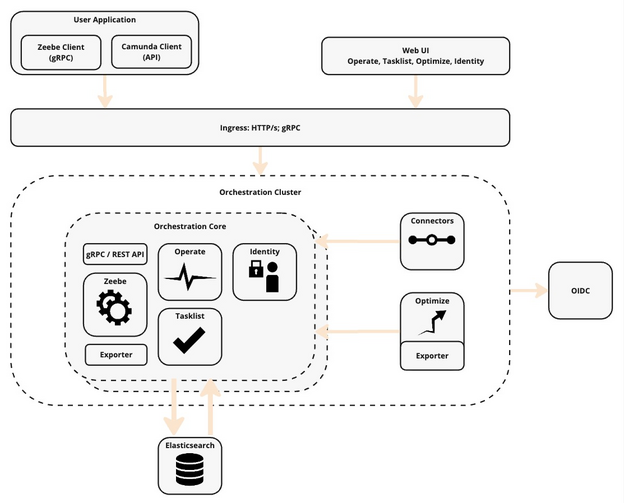
Zeebe is designed as cloud-native, providing the scalability and security required for enterprises to future-proof their process orchestration efforts. Since Zeebe doesn’t depend on an external database, there are no bottlenecks. It’s an approach that allows for improved scaling.
Distributed processing can easily be accomplished across a cluster of machines delivering high throughput. You can add cluster nodes to process an unlimited number of transactions at consistent low latencies.
Camunda 8 supports gRPC as an alternative to REST for client communication. This yields efficiency gains in high-load, low-latency scenarios, enabling you to cover a new set of use cases, such as real-time parcel tracking and customer notifications (see the GLS group case study).
Zeebe is also designed for resilience and security. The Zeebe engine employs external task patterns to separate the workflow engine from the process, thereby diminishing vulnerability to attacks through a shift in architecture. The likelihood of downtime or data loss is minimal with Zeebe because of its enterprise-grade resiliency.
As orchestration scales across clusters and teams, Camunda Console provides a unified view of deployments, API usage, and system integrations. Whether managed in the cloud or on-prem, Console supports visibility and governance across the entire orchestration ecosystem.
Enhanced team productivity and collaboration
Most companies are looking at centralizing technology and technology offerings within their organization to provide self-service to their organization. By building a center of excellence (CoE), you can provision workflow engines while still managing them centrally. The CoE takes care of updating the engine, collecting licensing metrics, and more, simplifying support, monitoring, and upgrades.
For example, you can avoid having different database and engine versions across the entire organization and serve them all from a centralized platform. You can choose a Kubernetes environment for your Camunda 8 cluster installation, or you can operate in SaaS in a self-service environment.
With Camunda 7, taking steps toward this type of CoE was much more difficult. Often, the CoE just allows projects to use the embedded engine, but then these projects need to manage the engine. Alternatively, an internal hosted offering is built, which normally means building management tools like a console on top. These things are out of the box with Camunda 8, simplifying and optimizing the move to a CoE.
Real-time collaboration between teams
Camunda 8 enables different teams to collaborate on processes to build rich models. Rich collaboration and visual modeling tools help teams design complex process flows collaboratively and before writing a single line of code. It enhances process design and streamlines process diagram design. This capability and real-time collaboration is not available with Camunda 7.
The newly added process landscape visualization feature in Web Modeler gives teams an aggregated, maplike view of all process models across departments, enabling clearer insights into automation coverage and gaps.
Out-of-the-box, reusable Connectors and blueprints
You can take advantage of new features like Connectors and blueprints, which enable you to quickly improve the automation and orchestration of your processes.
One of the most common components of process orchestration is communicating with other systems, which required programming skills and developers in Camunda 7. With out-of-the-box and build-your-own Connectors, you have a robust approach to streamlining process design with Camunda 8.
Camunda 8 includes reusable, built-in Connectors that can simply be dragged into your BPMN process. You can save your own configurations of these Connectors set with API endpoints and authentication for wider reuse within your organization.
Camunda 8 supports bidirectional connectivity through both outbound and inbound Connectors:
- Outbound Connectors enable Camunda-based processes to trigger things to happen in external systems or services.
- Inbound Connectors enable processes in Camunda Platform to receive data or messages from external systems or services.
Camunda 8 also introduced process application blueprints that provide everything to satisfy a particular use case, including BPMN process models, DMN decision tables, and Forms.
Blueprints are a great way to get started with Camunda and BPMN. When you download a process application blueprint to Camunda 8’s Modeler (SaaS or self-managed), you can immediately start learning from it, experimenting with it, and tailoring it to your needs.
Camunda Marketplace is a trusted source of blueprints and Connectors that help you get started quickly and orchestrate processes across a variety of technologies. These can be downloaded with a click of a button,either for SaaS or Self-Managed.
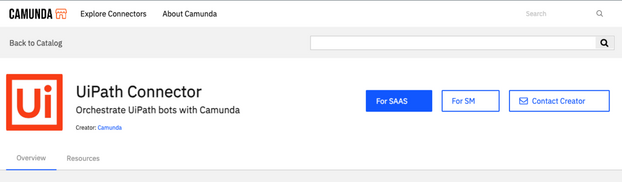
These Connectors can save developers time and effort building processes but do not restrict what they can do in any way.
User-friendly FEEL, supercharged with Camunda Copilot
Camunda had adopted Friendly Enough Expression Language (FEEL) with Camunda 8 as the scripting language in BPMN diagrams, DMN, and Forms. With Camunda 7, Java Unified Expression Language (JUEL) is used to build expressions and this usually requires Java users to build these expressions.
FEEL is specifically designed to be easily understandable by business users, not just developers or technical experts. Its syntax is more user-friendly, resembling natural language constructs, making it easier for nontechnical stakeholders to comprehend and validate rules.
FEEL is part of the DMN standard. Individuals who have experience or exposure to DMN-based tools or environments might already be familiar with FEEL. This familiarity can ease the learning curve and encourage broader adoption within organizations already using DMN.
FEEL’s ability to work well with JSON data structures is advantageous in today’s technology landscape, where JSON (JavaScript Object Notation) is extensively used for data exchange and configuration. Its compatibility with JSON makes it a suitable choice for handling and manipulating data in modern applications.
Newly released in Camunda 8.8 Alpha5, FEEL capabilities in Camunda’s Copilot leverage integrated generative AI to write and debug executable FEEL expressions. This adds another powerful dimension to Camunda Copilot’s existing BPMN capabilities. Users can now generate BPMN-compliant diagrams from natural language descriptions (or, for that matter, create documentation based on a BPMN diagram) and immediately enrich them with executable business logic, all without writing complex code or switching out of Modeler.
Achieve process orchestration maturity with Camunda 8
Embracing a CoE, taking advantage of Connectors, tracking KPIs, applying process governance, and more with Camunda 8 helps move your organization to a higher level of process orchestration maturity.
The Process Orchestration Maturity Model seeks to identify organizations’ comfort levels and ability to execute process orchestration projects and strategies across a number of drivers and factors that help inform their maturity level. Improving maturity helps teams overcome people and technology challenges that might be standing in the way of meeting process automation goals.

Of course, there are certain drivers that can negatively impact your progress, like slow response times that impact the process experience or high legacy infrastructure maintenance costs.
Migrating to Camunda 8 can help surmount these situations with an engine designed for throughput. Organizations can create CoEs, taking advantage of multi-tenancy and the cloud to provide a centralized location for process design and development.
A focus on KPIs and strategic process projects will demonstrate process orchestration’s contribution to business outcomes. With machine-learning-ready data sets in Optimize and decision targets with AI, Camunda 8 will support your journey to process orchestration maturity.
More innovative features to come
We’re continuing to invest in end-to-end process orchestration, native AI, and agentic orchestration capabilities to help our customers modernize and meet future challenges successfully, at scale, and with resilience. You can always check our public roadmap to see what new features are coming to Camunda 8.
Ready to migrate? Here’s where to start!
Migrating to Camunda 8 is more than a technical upgrade or replatform; it’s a chance to turn orchestration into innovation and a competitive advantage for your organization. Camunda 8 adopters already report faster time‑to‑market, increased business and IT alignment, and lower cost‑to‑serve. With Camunda 7 support winding down and Camunda 8.8 bringing streamlined architecture this October, now is the ideal time to plan your transition.
Key first steps to take:
- Get oriented: Understand what needs to be done to migrate and what effort to expect. Educate yourself using our Migration Guide, Camunda Academy, and migration blogs.!
- Analyze your solution: We’ve got a migration analyzer & diagram converter that can help!
- Determine when you should migrate: Understand support timelines. And remember, all new solutions should start on Camunda 8!
- Define your target Camunda version for migration: Likely 8.8 (October 2025) or 8.9 (April 2026). You can always check the public feature roadmap to understand timelines for important feature releases.
- Ease your migration with our migration tooling: In addition to the migration analyzer & data converter, we also have a data migrator and code converter to aid your migration efforts.
- Get expert support on your implementation: Reach out to one of our Recognized Migration Partners.
We’re here to help!
Schedule a migration workshop. Our no-cost Migration Evaluation Workshop is two half-day sessions designed to help Enterprise customer business and technical teams understand, plan, and execute a successful transition to Camunda 8.
Live webinar: Migration strategies and Expert Q&A
Join us live on July 10 at 10:00 a.m. EDT for our “Designing Your Camunda 7 to 8 Migration Strategy” webinar. We’ll cover common migration approaches, key technical considerations, tooling updates, and practical tips for a smooth migration to Camunda 8. You can also get your questions answered during a live Q&A with our experts.
Stay tuned for more migration information
We will continue to provide additional information and updates around the migration process and tools to assist you and your organization in making this transition.
In the meantime, check out these migration resources:
can`t access the post. think there is a typo in the link
Not sure what happened there, but I’m asking to have that fixed. Thanks for letting us know @emaarco and posting the correct link above!
Thanks for flagging this, @emaarco ! Sorry for the trouble – I’ve updated the link.
Continue the discussion at forum.camunda.io